Practical Malware Analysis chapter 1 & chapter 3

Toolkit
This labs uses a standard set of tools for basic static analysis & basic dynamic analysis.
| Tool | Type | Purpose | Typical usage / notes |
|---|---|---|---|
| PE Studio | Static | Inspect PE headers, imports/exports, suspicious indicators | Open binary → check indicators, suspicious strings, packer flags |
| PEiD | Static | Detect packers/compilers | Run against sample to identify obfuscation/packer |
| PEview | Static | Low-level PE structure view (sections, headers, timestamps) | Inspect section names, RVA, entry point, timestamp |
| Detect It Easy (DIE) | Static | Detect packers, file format, basic signatures | Quick identification of packer/packer score |
| Strings | Static | Extract printable strings (URLs, file paths, commands) | strings -a sample.exe → review for IOCs |
| Dependency Walker | Static | List DLL dependencies and resolved imports | Reveal runtime dependencies and suspicious API usage |
| Process Monitor (Procmon) | Dynamic | Trace file, registry, process, and thread activity at runtime | Run before/after execution → filter by process name |
| Process Explorer | Dynamic | Inspect running processes, loaded DLLs, handles | Check parent/child relationships and injected DLLs |
| RegShot | Dynamic | Snapshot registry / filesystem changes (before/after) | Take snapshot → run sample → compare for persistence artifacts |
| Wireshark | Dynamic | Capture and inspect network traffic / connections | Capture traffic during execution; filter by IP/port |
Lab 1-1
📝 Summary
In this lab, we analyze Lab01-01.exe and Lab01-01.dll using static analysis techniques.
Our goal is to identify suspicious characteristics, determine the purpose of the files, and extract any host-based or network-based indicators.
📍 Question 1: VirusTotal Detections
Do either files match any existing antivirus signatures?
🟩 Lab01-01.exe
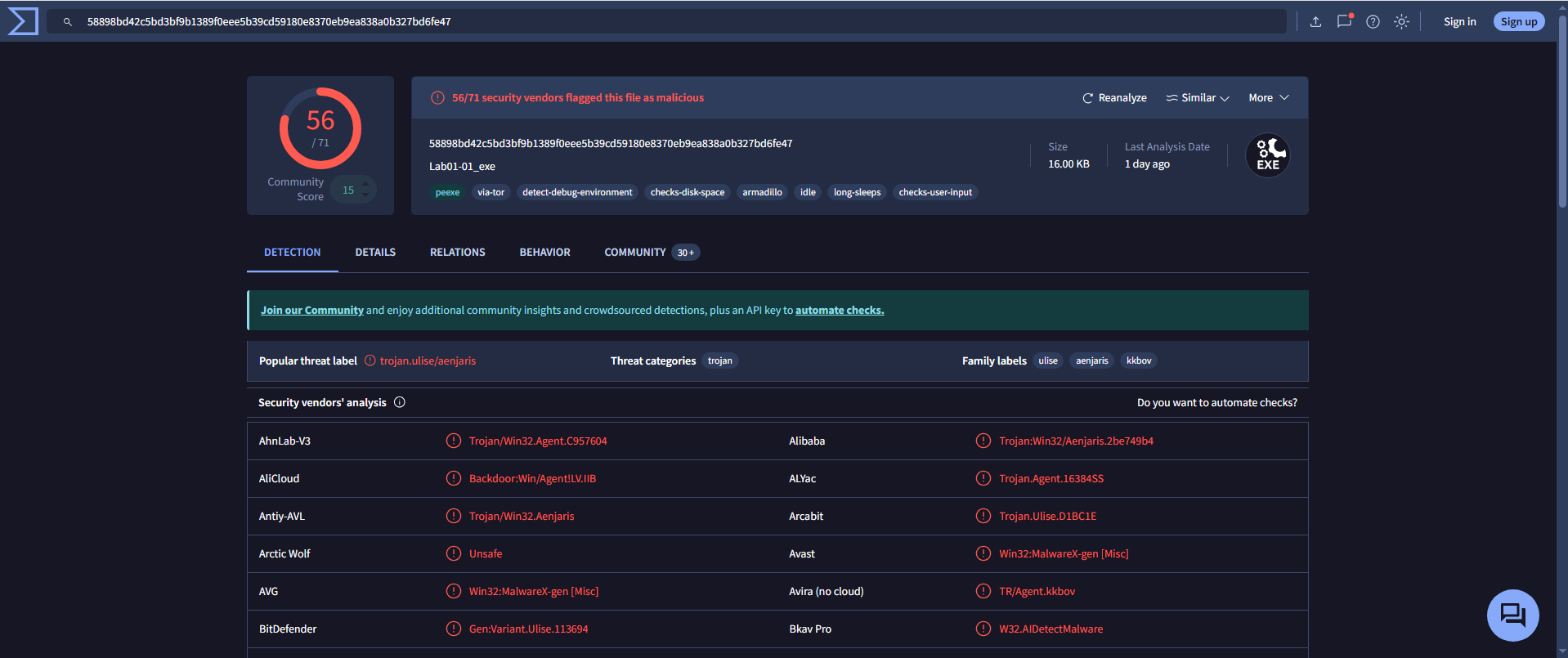
- Detection Ratio:
56 / 71 - Common AV Detections:
CrowdStrike Falcon: Win/malicious_confidence_100%AVG: Win32:MalwareX-gen
🟨 Lab01-01.dll
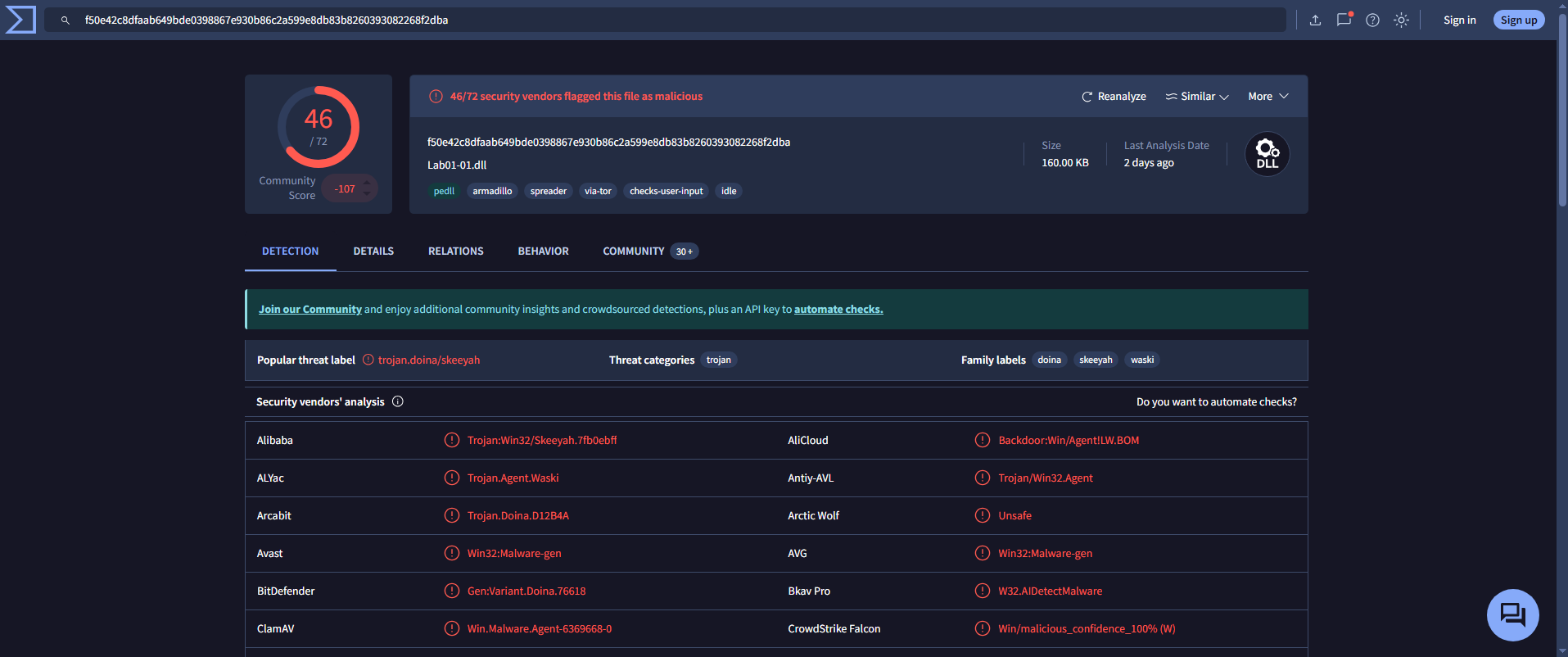
- Detection Ratio:
46 / 72 - Common AV Detections:
AVG: Win32:Malware-genBitdefender: Gen:Variant.Doina.76618
📍 Question 2: Compilation Timestamps
When were these files compiled?
🟩 Lab01-01.exe
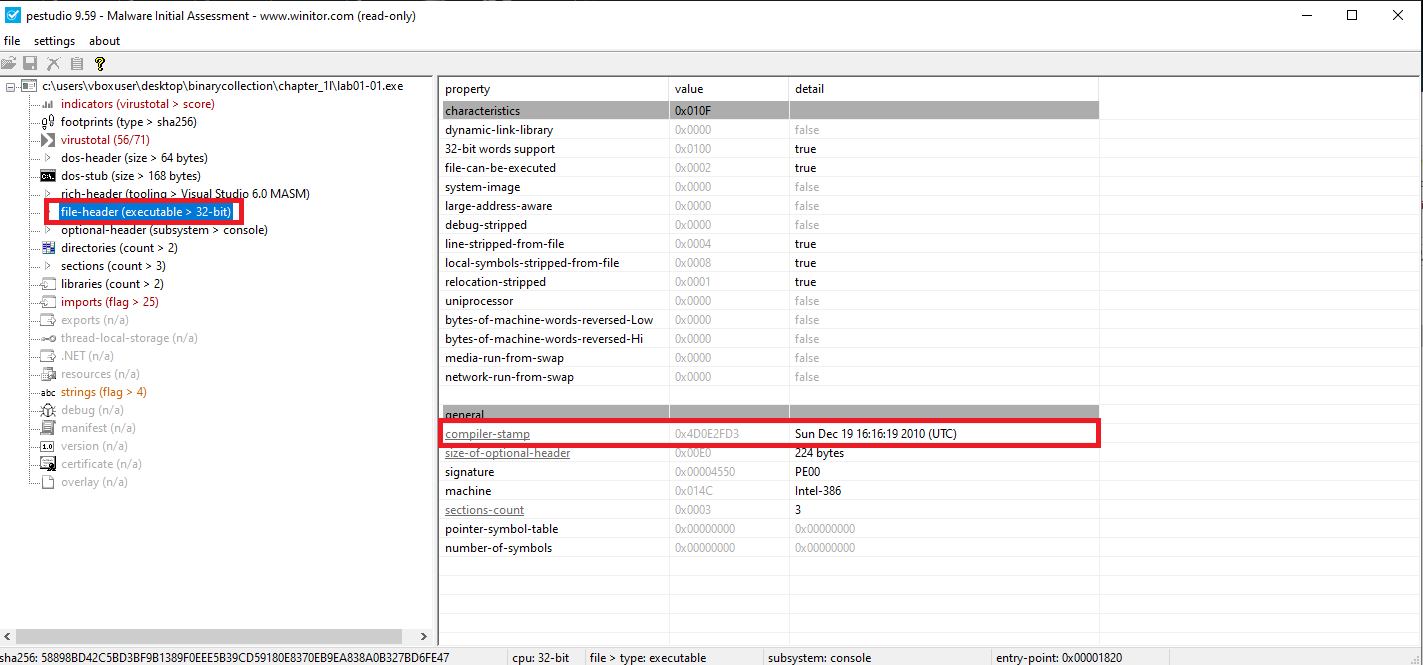
🟨 Lab01-01.dll
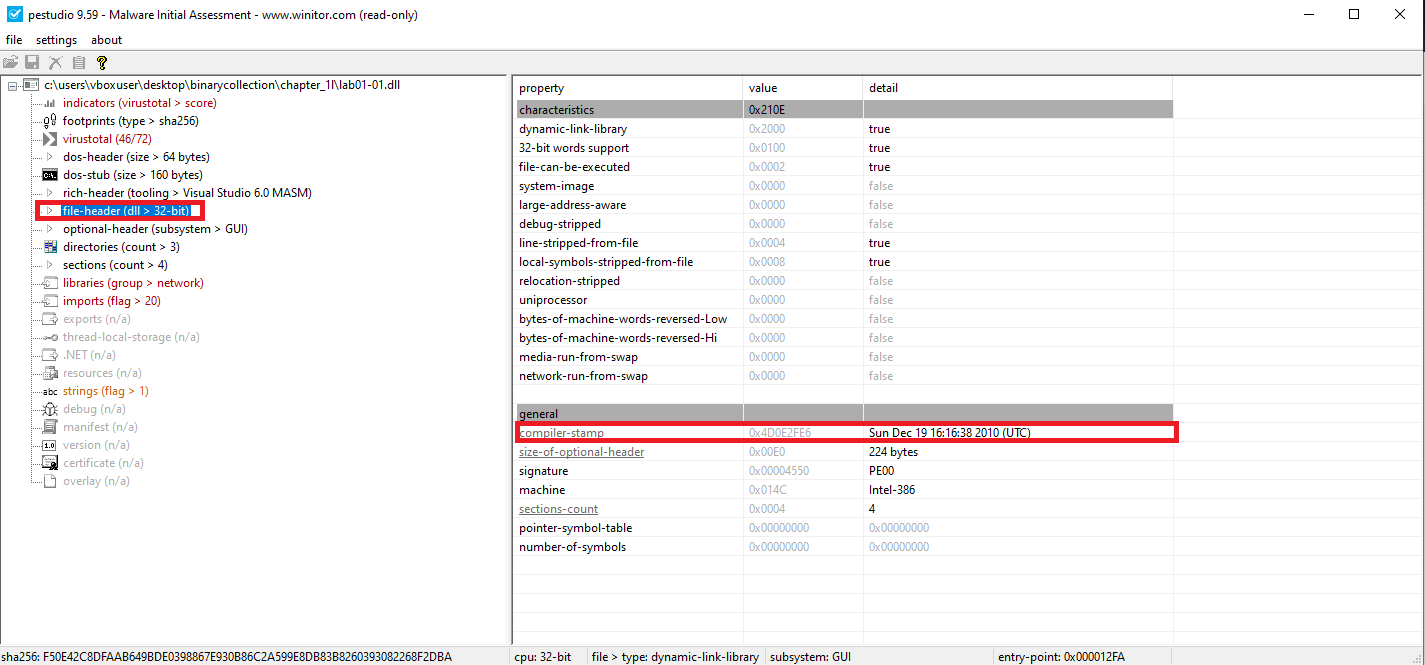
| File | Compilation Time (UTC) |
|---|---|
Lab01-01.exe | Sun Dec 19 16:16:19 2010 |
Lab01-01.dll | Sun Dec 19 16:16:38 2010 |
📍 Question 3: Packed or Obfuscated?
Are there any indications that either file is packed or obfuscated?
🟩 Lab01-01.exe
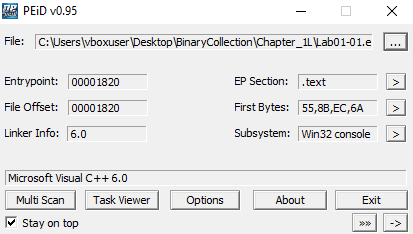
- PEiD identifies compiler as Microsoft Visual C++ 6.0
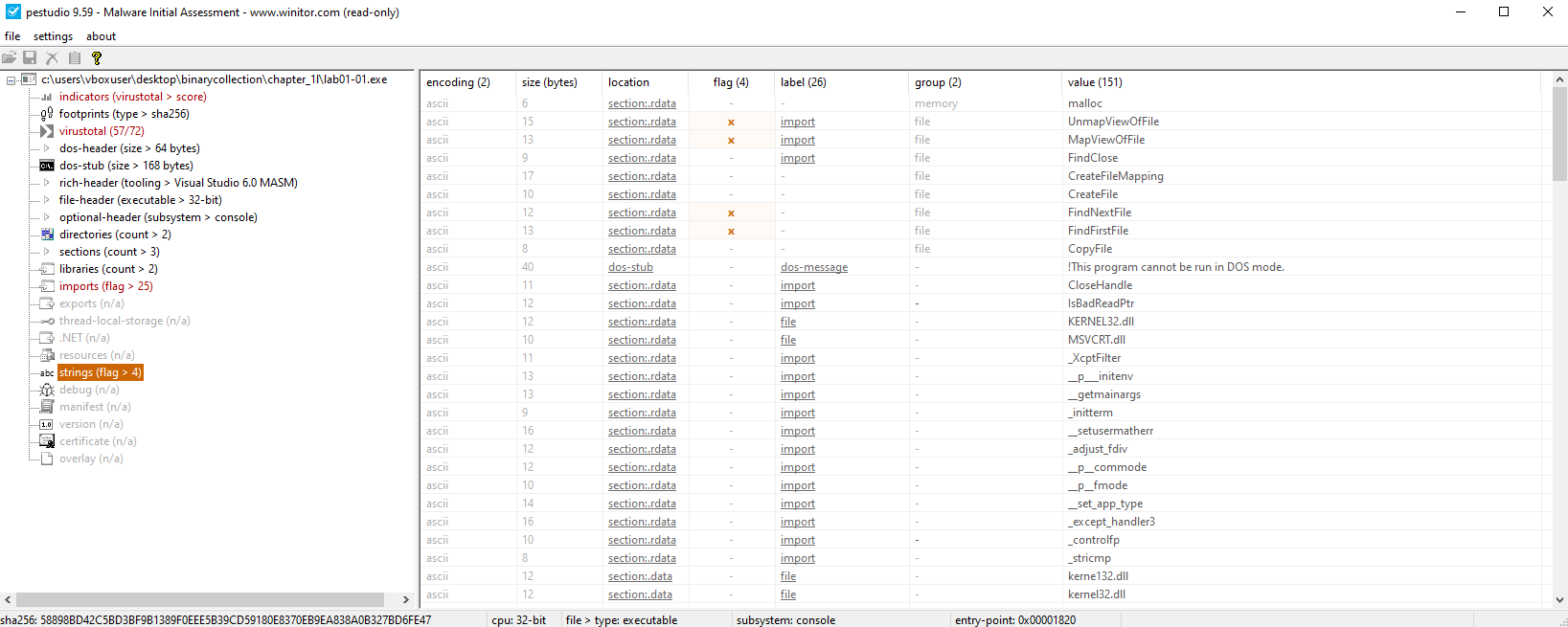
- Strings are clearly visible
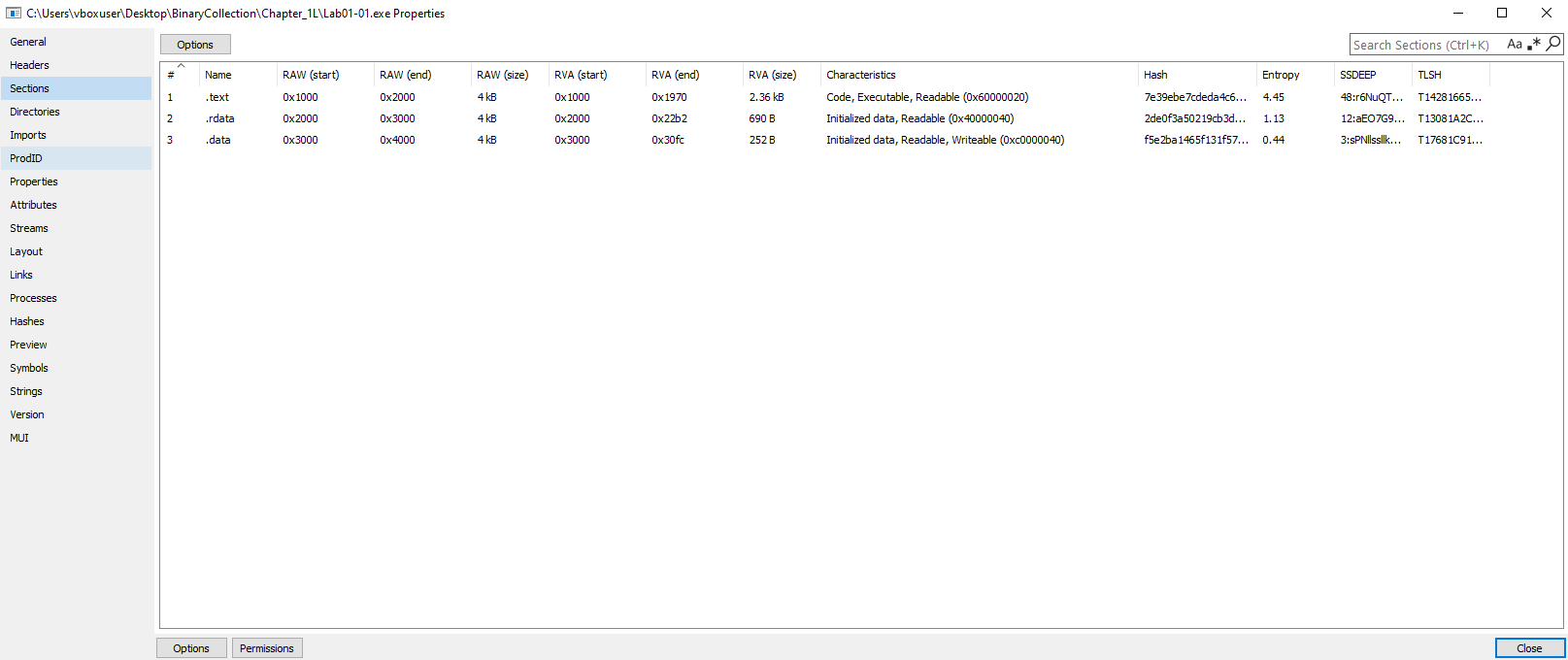
- Normal entropy values
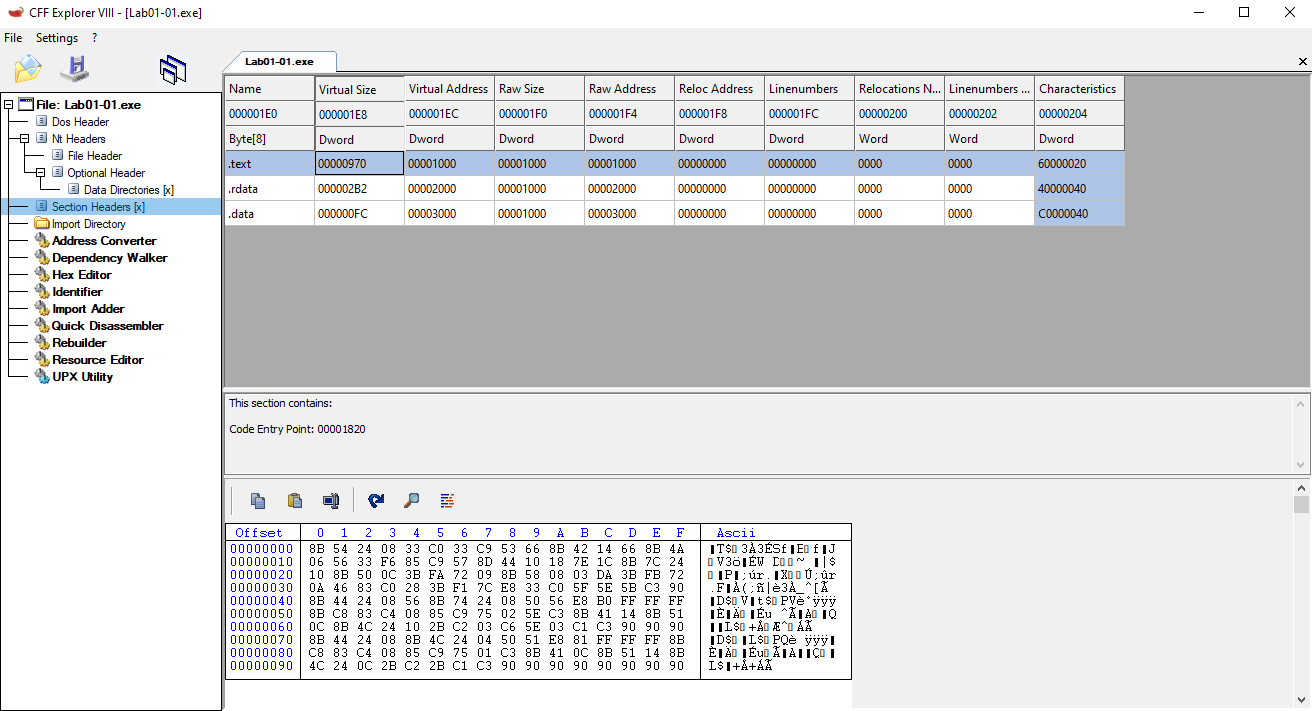
- Standard section names like
.text,.data,.rdata - Virtual size ≈ Raw size
🟨 Lab01-01.dll
Same characteristics as above:
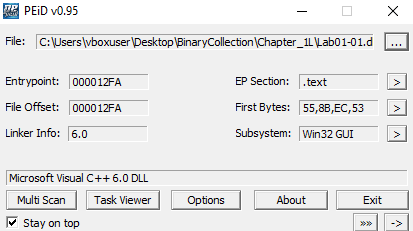
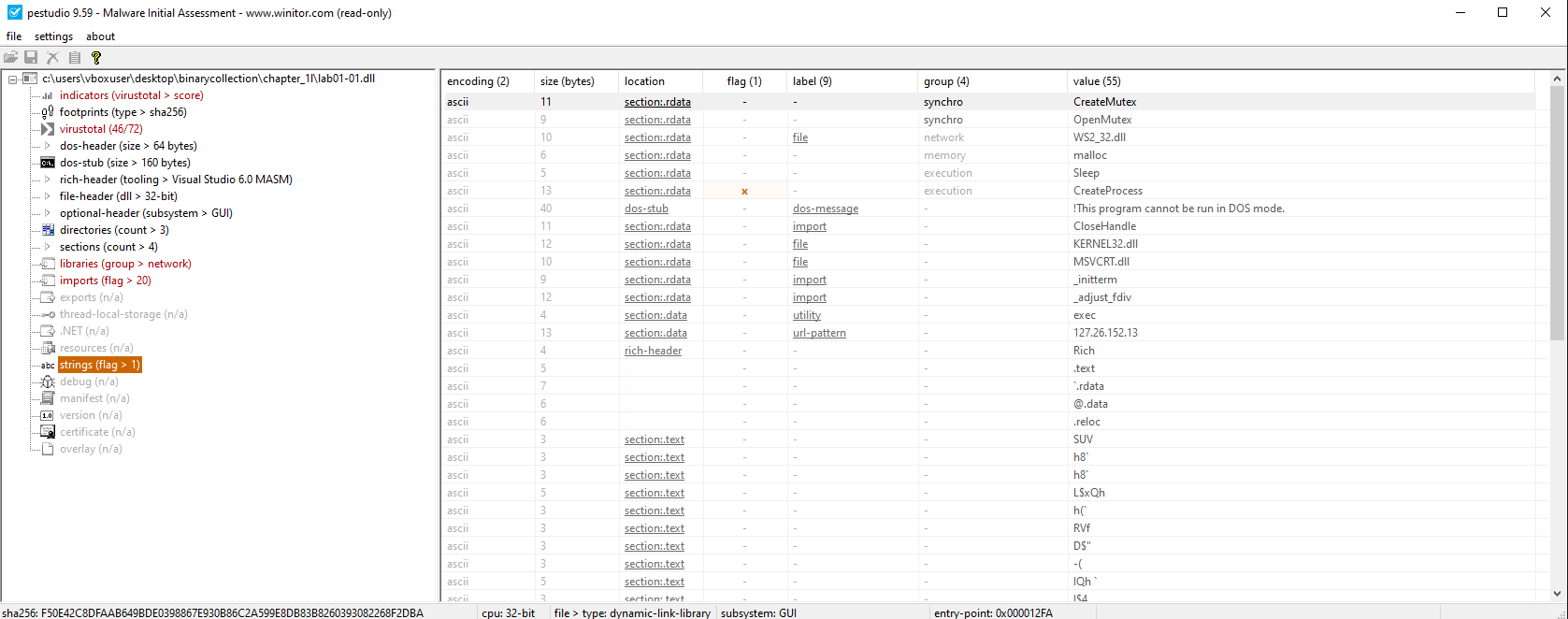
Conclusion: There is no indication that these files are packed or obfuscated.
📍 Question 4: Suspicious Imports
Do any imports hint at what this malware does?
🟩 Lab01-01.exe
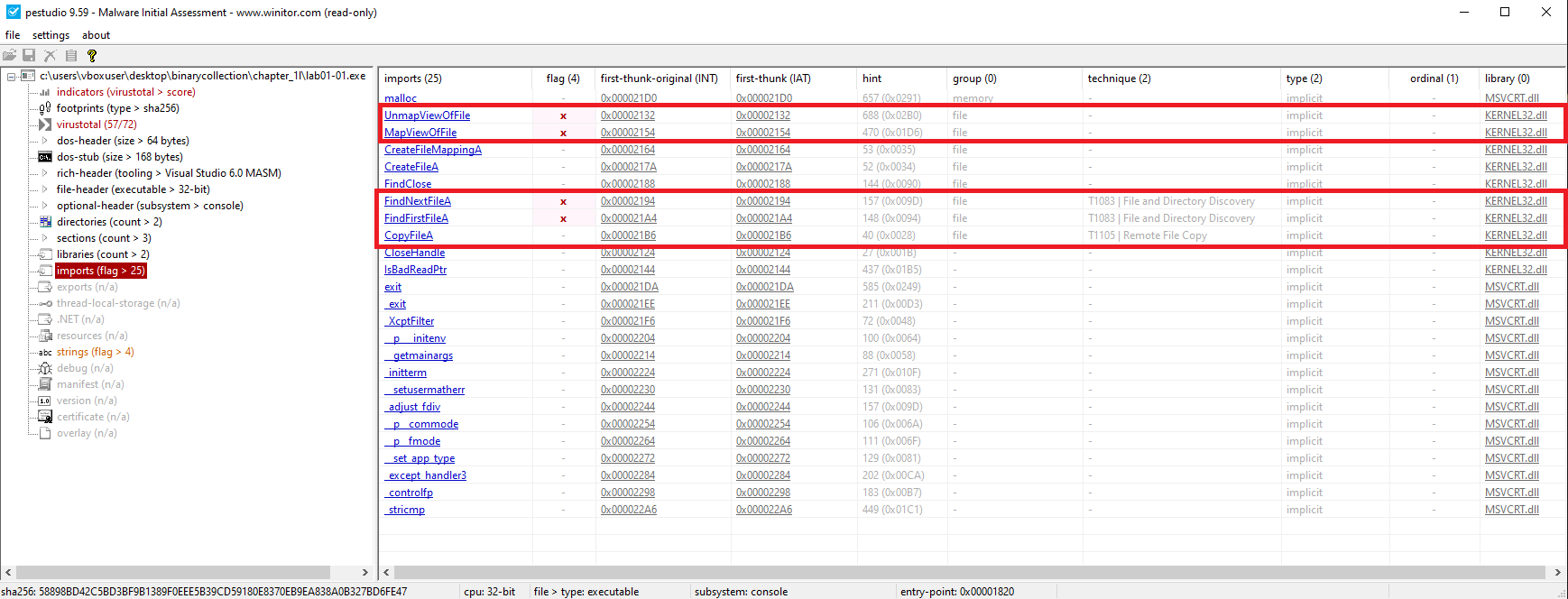
Key Imports (KERNEL32.DLL):
CopyFileAFindFirstFileA()FindNextFileA()
Indicates file enumeration and manipulation functionality.
🟨 Lab01-01.dll
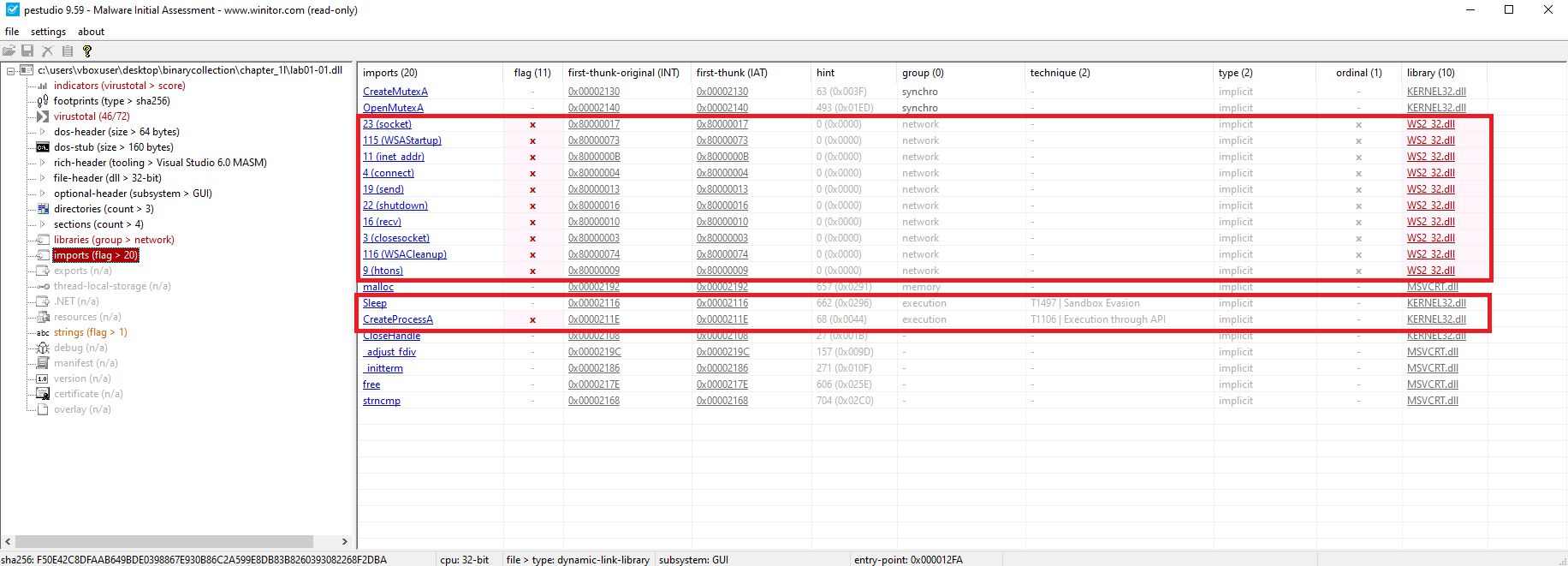
Key Imports (KERNEL32.DLL):
CreateMutexA()– ensures single instanceCreateProcessA()– spawns new processesSleep()– possible anti-analysis
Key Imports (WS2_32.DLL):
WSAStartup(),socket(),connect()– network communication (C2)
📍 Question 5: Host-Based Indicators
Are there any files or artifacts to look for on infected systems?
🟩 Lab01-01.exe
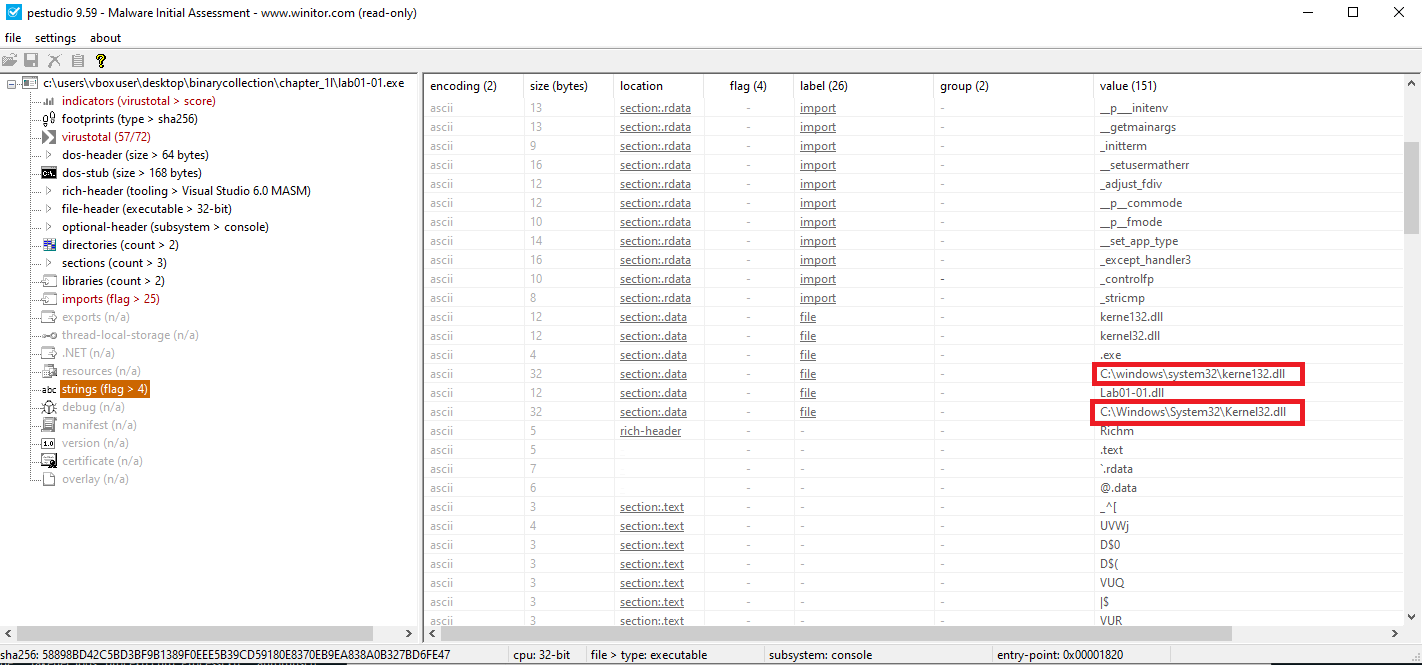
Possible copied path:
C:\windows\system32\kerne132.dll
🟨 Lab01-01.dll
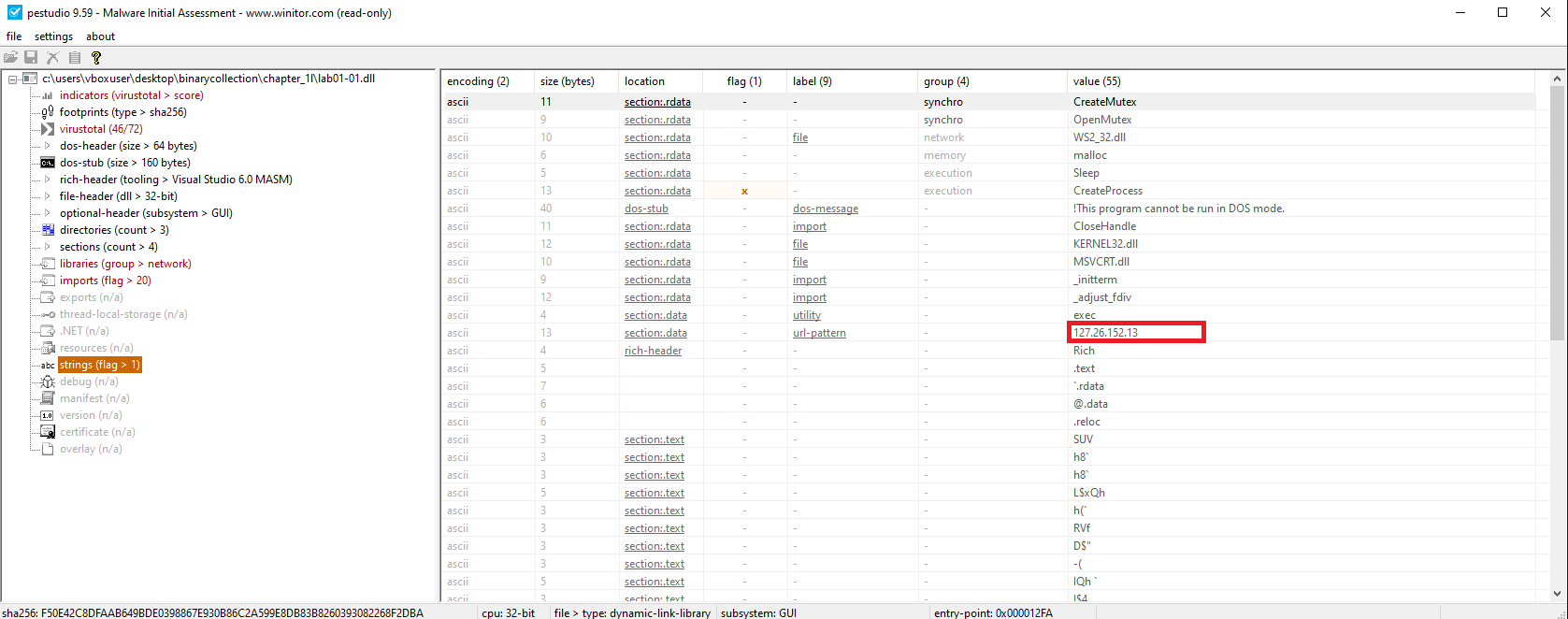
Hardcoded IP address:
127.26.152.13
📍 Question 6: Network-Based Indicators
What network-based indicators could be used to detect this malware?
🟩 Lab01-01.exe
No observed network indicators
🟨 Lab01-01.dll
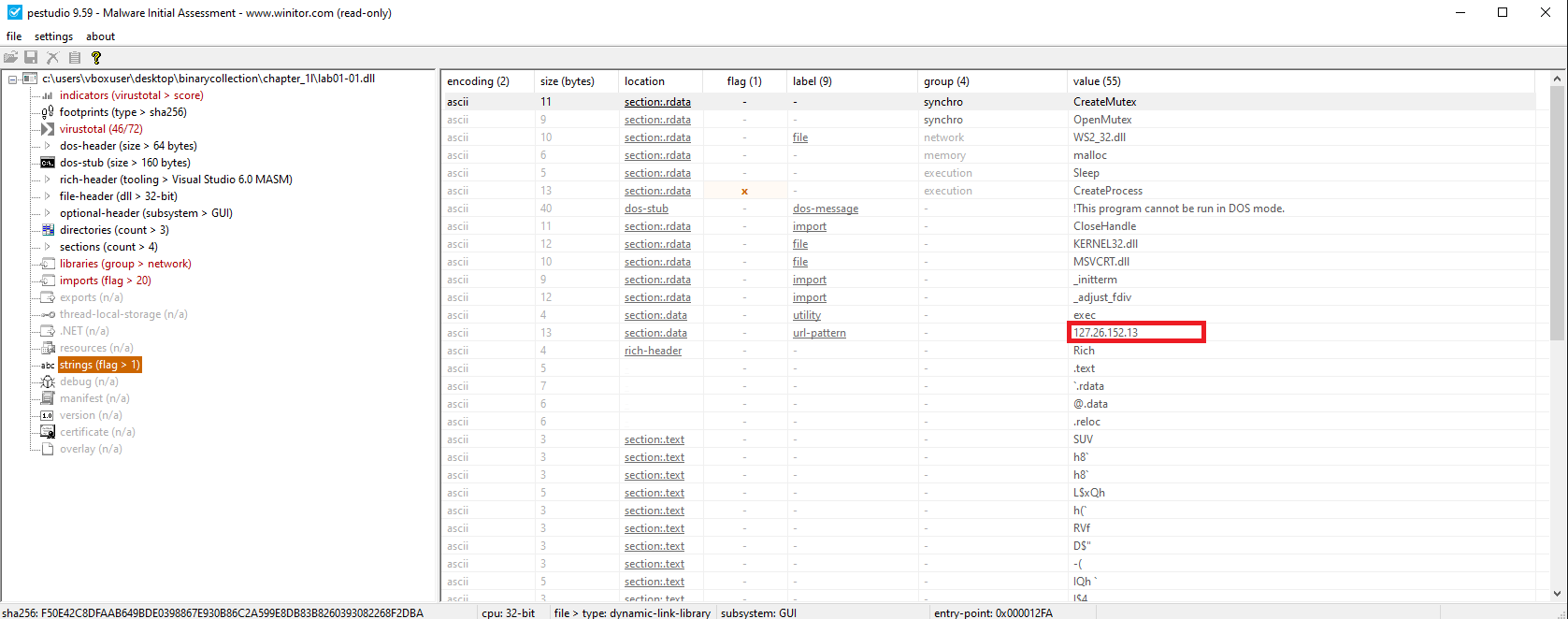
Connects to:
127.26.152.13
📍 Question 7: Purpose of the Files
What is the suspected purpose of these files?
🟩 Lab01-01.exe
Its purpose is to deploy and execute the malicious DLL on the system, potentially copying it to the System32 directory for persistence.
🟨 Lab01-01.dll
Its purpose is to function as a backdoor or Remote Access Trojan (RAT) — enabling file system access and communication with a C2 server.
Lab 1-2
📝 Summary
In this lab, we analyze Lab01-02.exe using static analysis techniques. Our goal is to identify suspicious characteristics, understand the program’s functionality, and extract any host-based or network-based indicators of compromise (IOCs).
📍 Question 1: VirusTotal Detections
🟥 Lab01-02.exe
Does Lab01-02.exe match any known antivirus signatures?
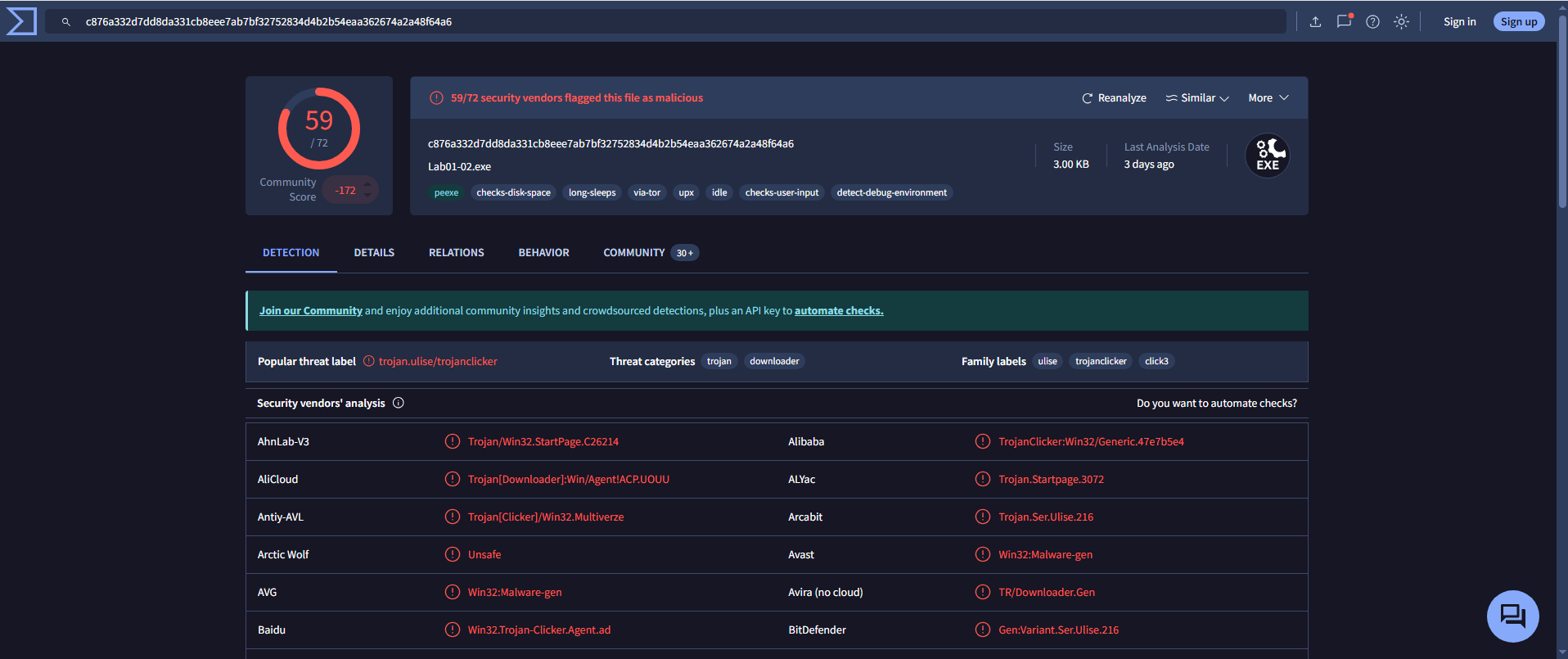
- Detection Ratio:
59 / 72 - Common AV Detections:
Avast: Win32:Malware-genAVG: Win32:Malware-gen
📍 Question 2: Packed or Obfuscated?
🟥 Lab01-02.exe
Are there any indications that this file is packed or obfuscated? If so, what are these indicators? If the file is packed, unpack it if possible.
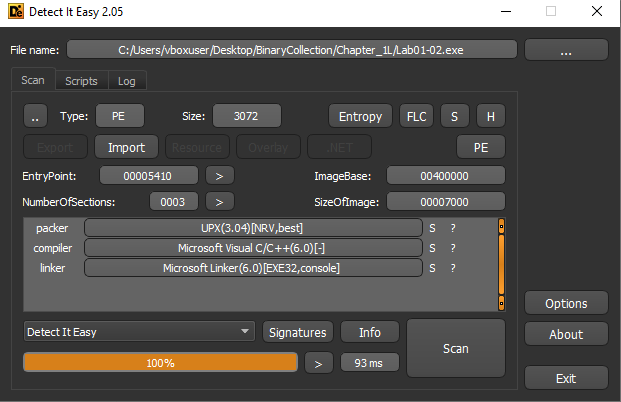
- Packing Detected:
Using Detect It Easy, the file is identified as packed with UPX (Ultimate Packer for eXecutables).
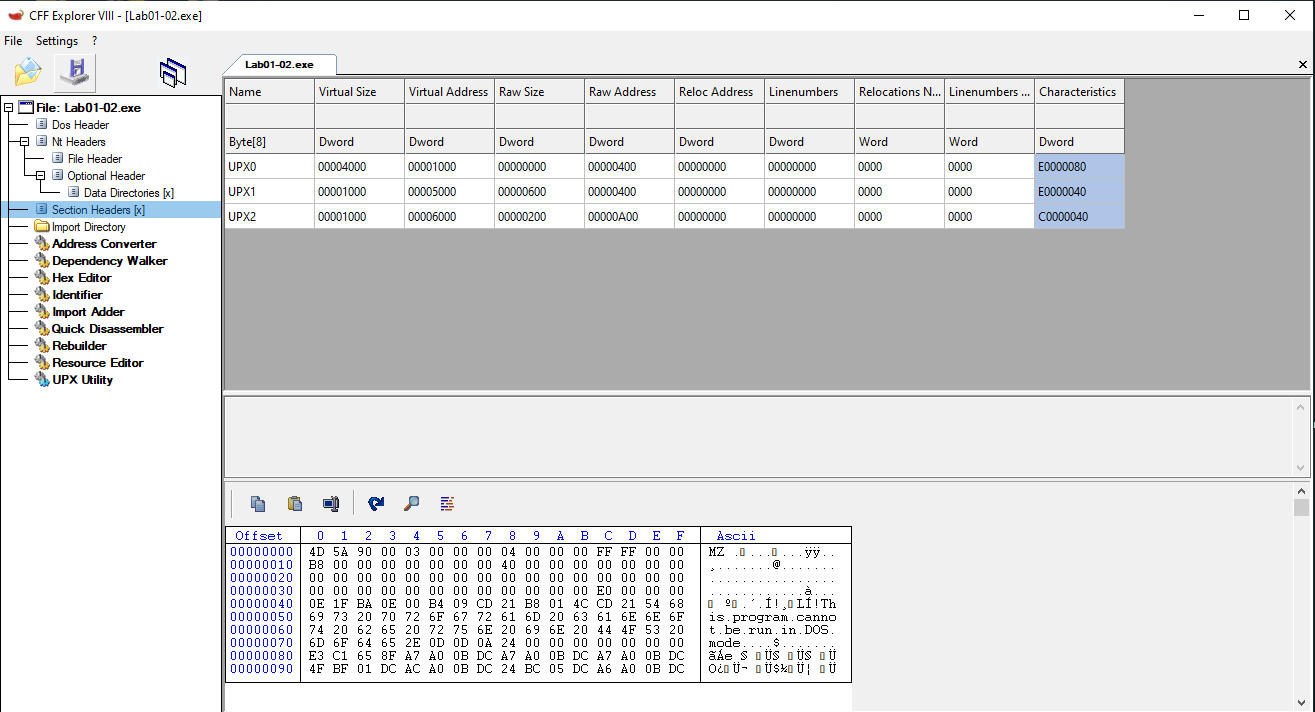
- Supporting Indicators:
- Sections named UPX0 and UPX1
- A large difference between Virtual Size and Raw Size
- Very limited imported functions (typical of UPX-packed binaries)
- No visible readable strings in the initial state
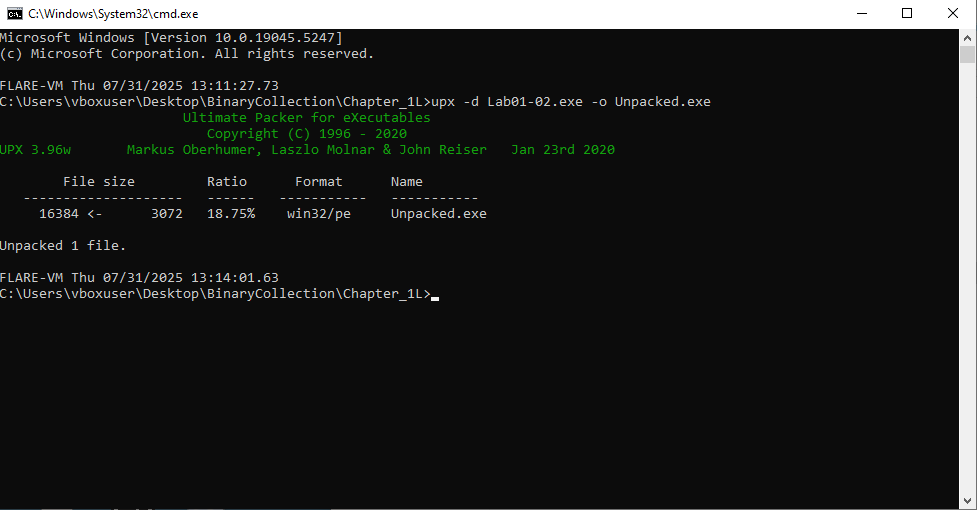
1
2
# Unpack Lab with UPX
upx -d Lab01-02.exe -o Unpacked.exe
📍 Question 3: Suspicious Imports
🟥 Lab01-02.exe
Do any imports hint at this program’s functionality? If so, which imports are they and what do they tell you?
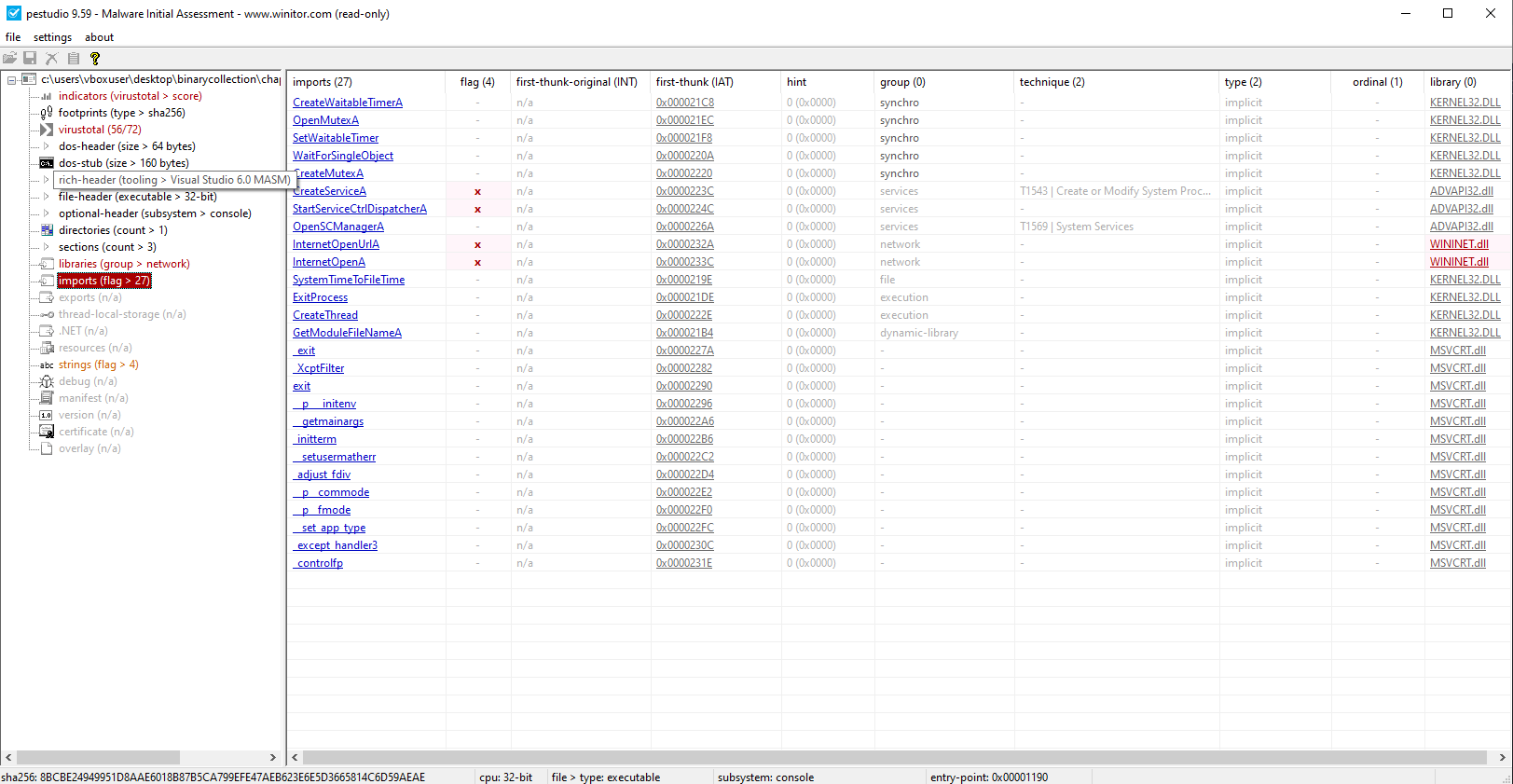
Key Imports (WININET.DLL):
InternetOpen()InternetOpenUrl()
These functions suggest the program may perform network communications, such as retrieving data from the internet, downloading additional payloads, or connecting to a command-and-control (C2) server.
Key Imports (ADVAPI32.DLL):
OpenSCManager()CreateService()StartServiceCtrlDispatcher()
These indicate functionality to create and manage Windows services, a common persistence mechanism that allows the malware to automatically run at system startup under elevated privileges.
📍 Question 4: Network-Based Indicators
🟥 Lab01-02.exe
What host- or network-based indicators could be used to identify this malware on infected machines?
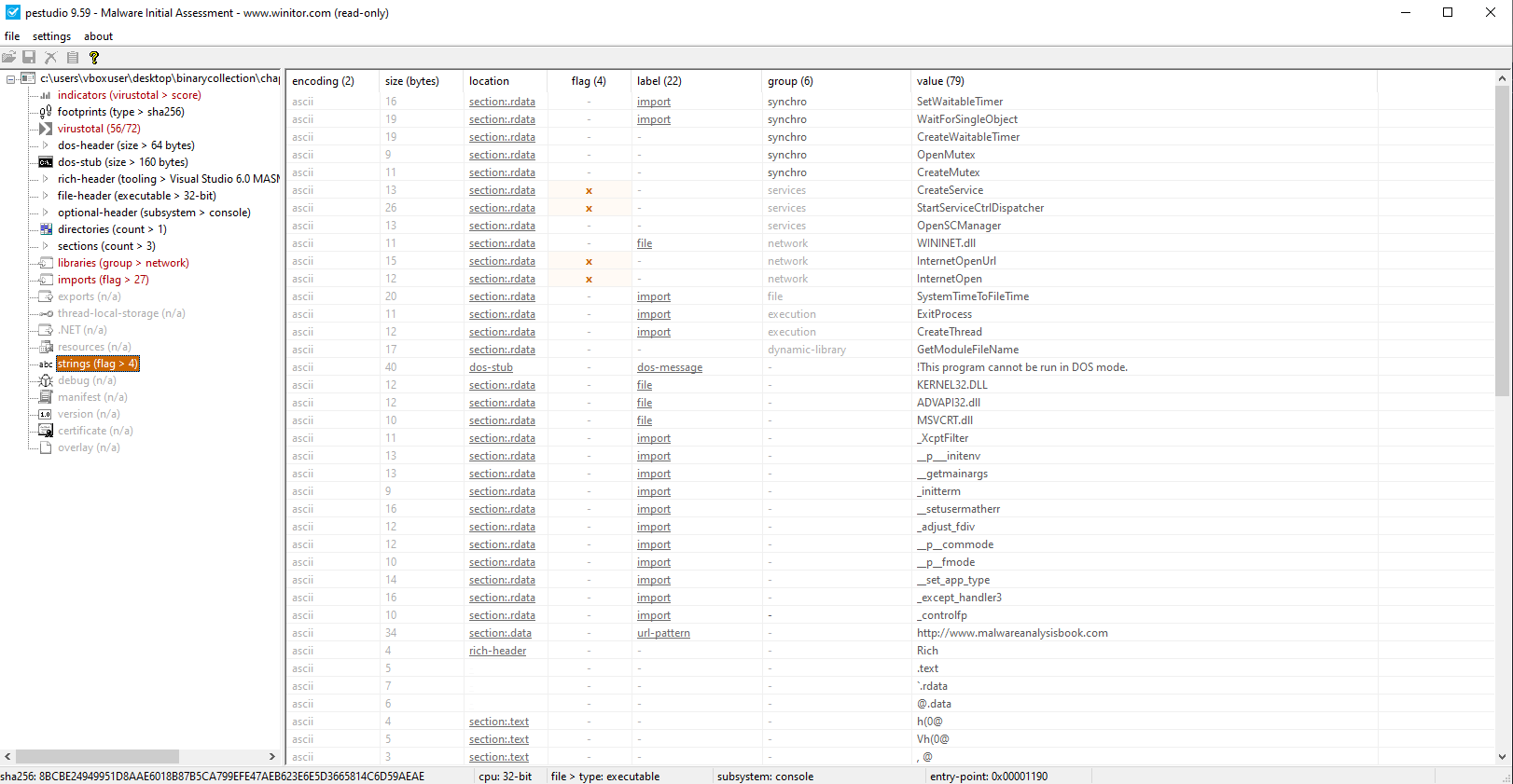
Connects to:
http://www.malwareanalysisbook.com
Lab 1-3
📝 Summary
In this lab, we analyze Lab01-03.exe using static analysis techniques. Our goal is to identify suspicious characteristics, understand the program’s functionality, and extract any host-based or network-based indicators of compromise (IOCs).
📍 Question 1: VirusTotal Detections
🟦 Lab01-03.exe
Does Lab01-03.exe match any known antivirus signatures?
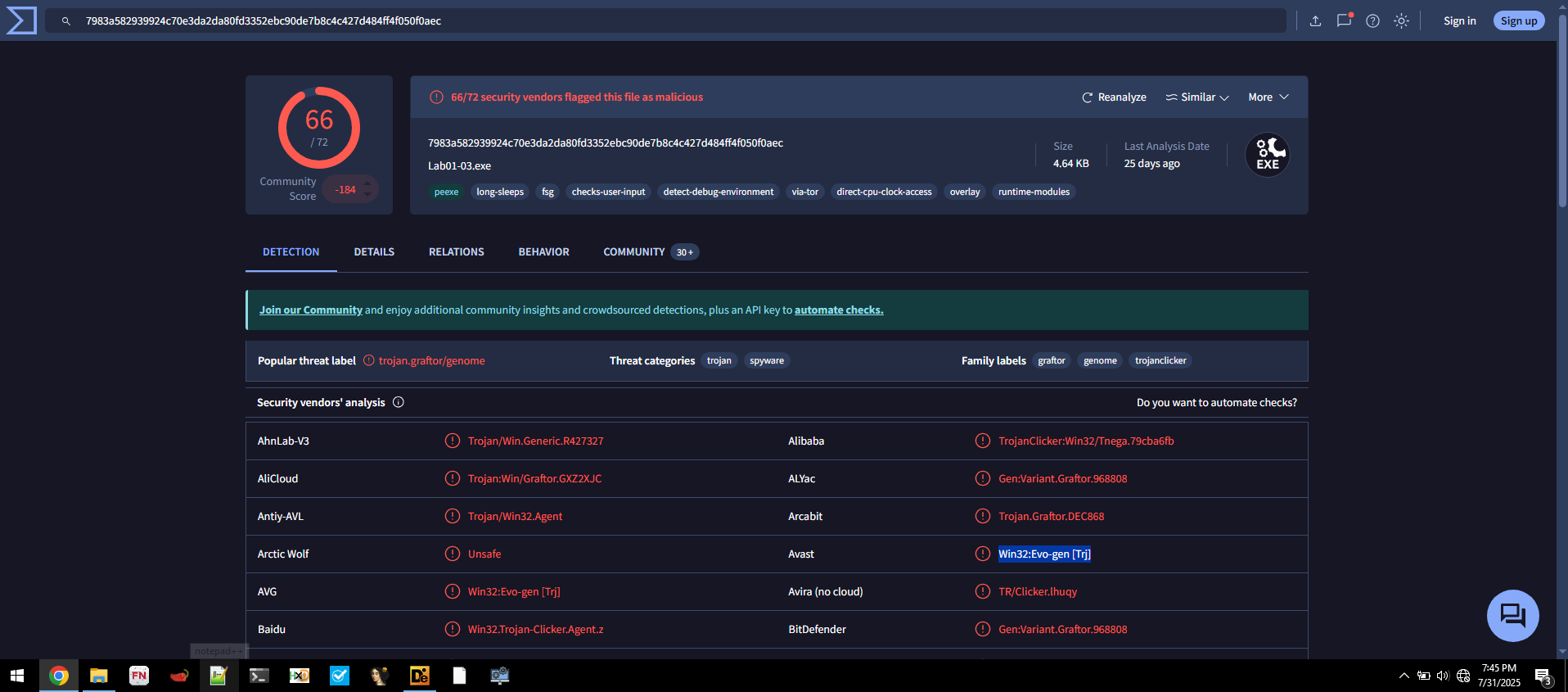
- Detection Ratio:
66 / 72 - Common AV Detections:
Avast: Win32:Evo-gen [Trj]AVG: Win32:Evo-gen [Trj]
📍 Question 2: Packed or Obfuscated?
🟦 Lab01-03.exe
Are there any indications that this file is packed or obfuscated? If so, what are these indicators? If the file is packed, unpack it if possible.
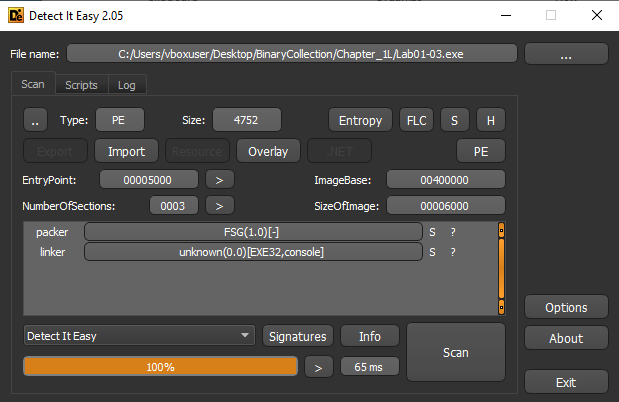
- Packing Detected:
Using Detect It Easy, the file is identified as packed with FSG (Fast Small Good) packer.
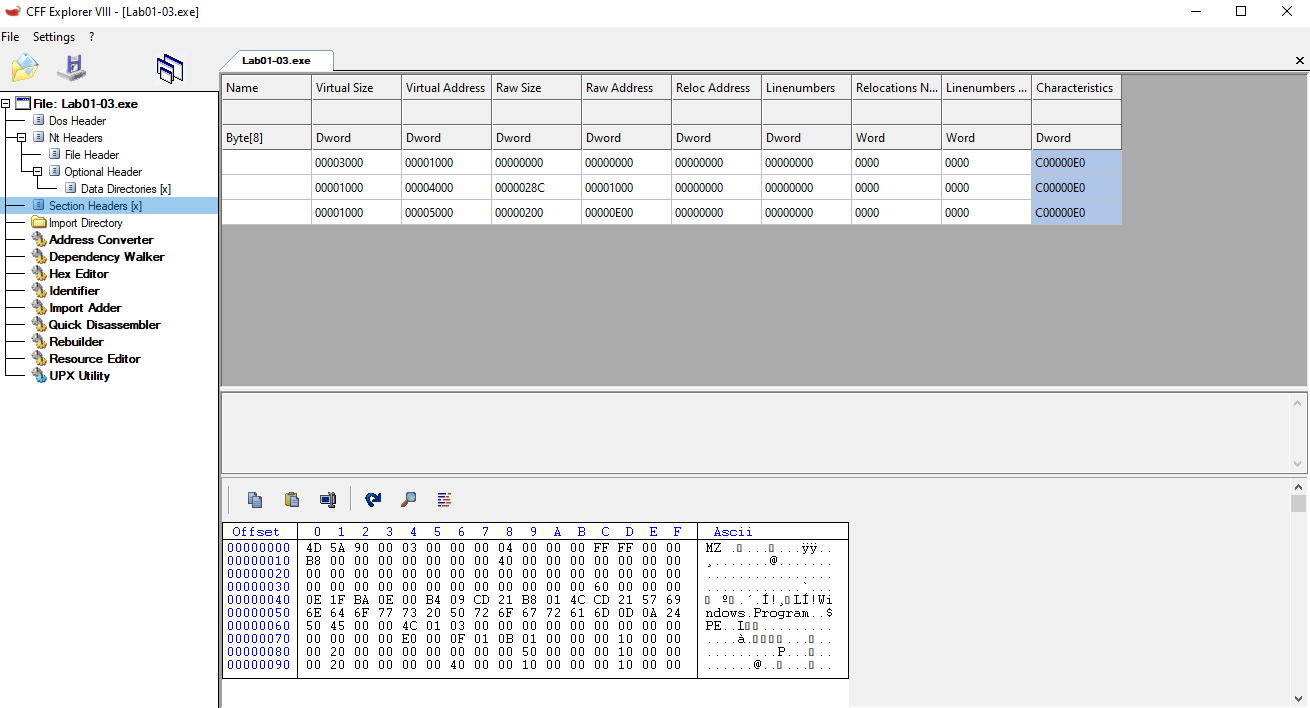
- Supporting Indicators:
- Sections unnamed
- A large difference between Virtual Size and Raw Size
- Very limited imported functions (typical of FSG-packed binaries)
- No visible readable strings in the initial state
we can’t unpack this file
📍 Question 3: Suspicious Imports
🟦 Lab01-03.exe
Do any imports hint at this program’s functionality? If so, which imports are they and what do they tell you?
⚠️ Note: To fully analyze suspicious imports, the file must be unpacked.
With the techniques learned so far, we are unable to unpack FSG.
📍 Question 4: Network-Based Indicators
🟦 Lab01-03.exe
What host- or network-based indicators could be used to identify this malware on infected machines?
Lab 1-4
📝 Summary
In this lab, we analyze Lab01-04.exe using static analysis techniques. Our goal is to determine whether the file is packed or obfuscated, identify its compilation details, and examine its imports to understand the program’s potential functionality. We also aim to extract host-based and network-based indicators of compromise (IOCs) and inspect the resource section for any hidden or embedded components.
📍 Question 1: VirusTotal Detections
🟪 Lab01-04.exe
Does Lab01-04.exe match any known antivirus signatures?
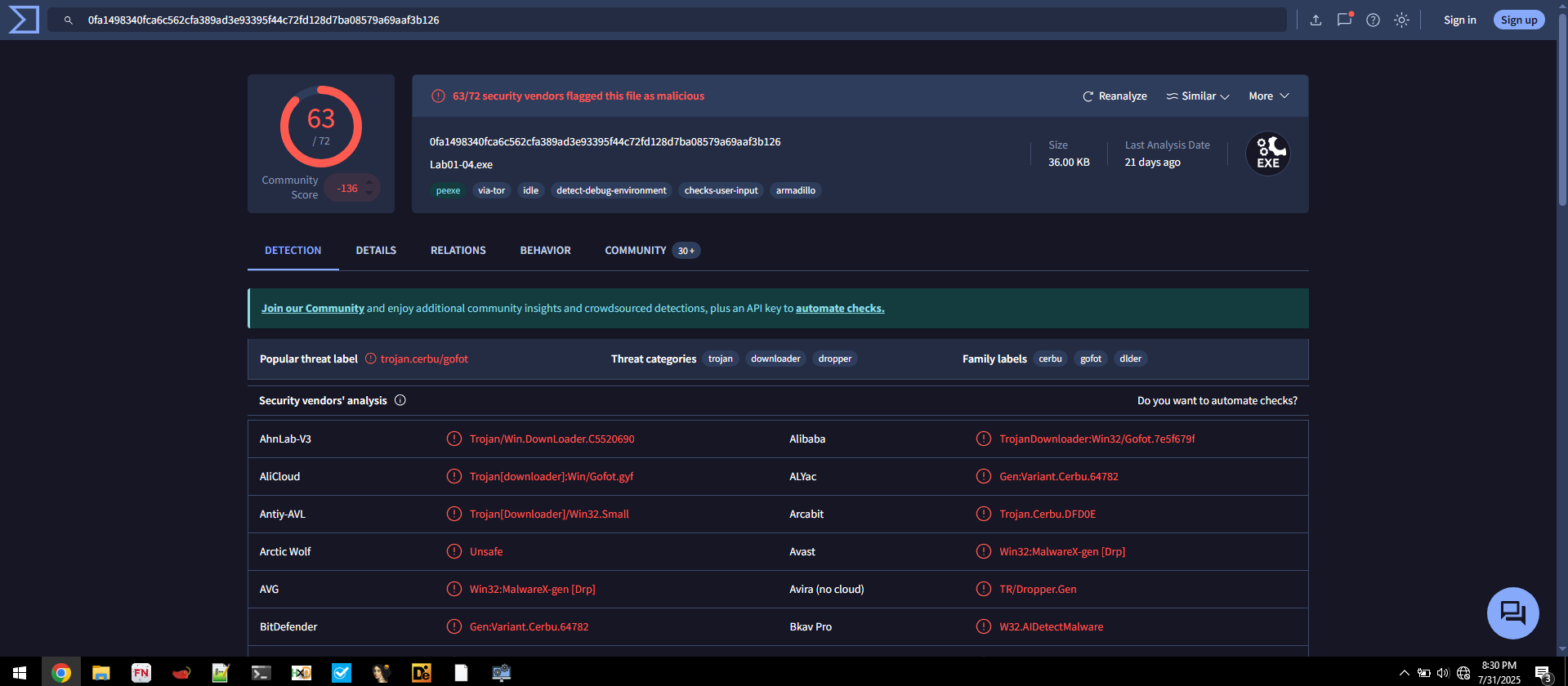
- Detection Ratio:
63 / 72 - Common AV Detections:
Avira: TR/Dropper.GenAVG: Win32:MalwareX-gen [Drp]
📍 Question 2: Packed or Obfuscated?
🟪 Lab01-04.exe
Are there any indications that this file is packed or obfuscated? If so, what are these indicators? If the file is packed, unpack it if possible.
Not Packed
📍 Question 3: compilation date?
🟪 Lab01-04.exe
When was this program compiled?
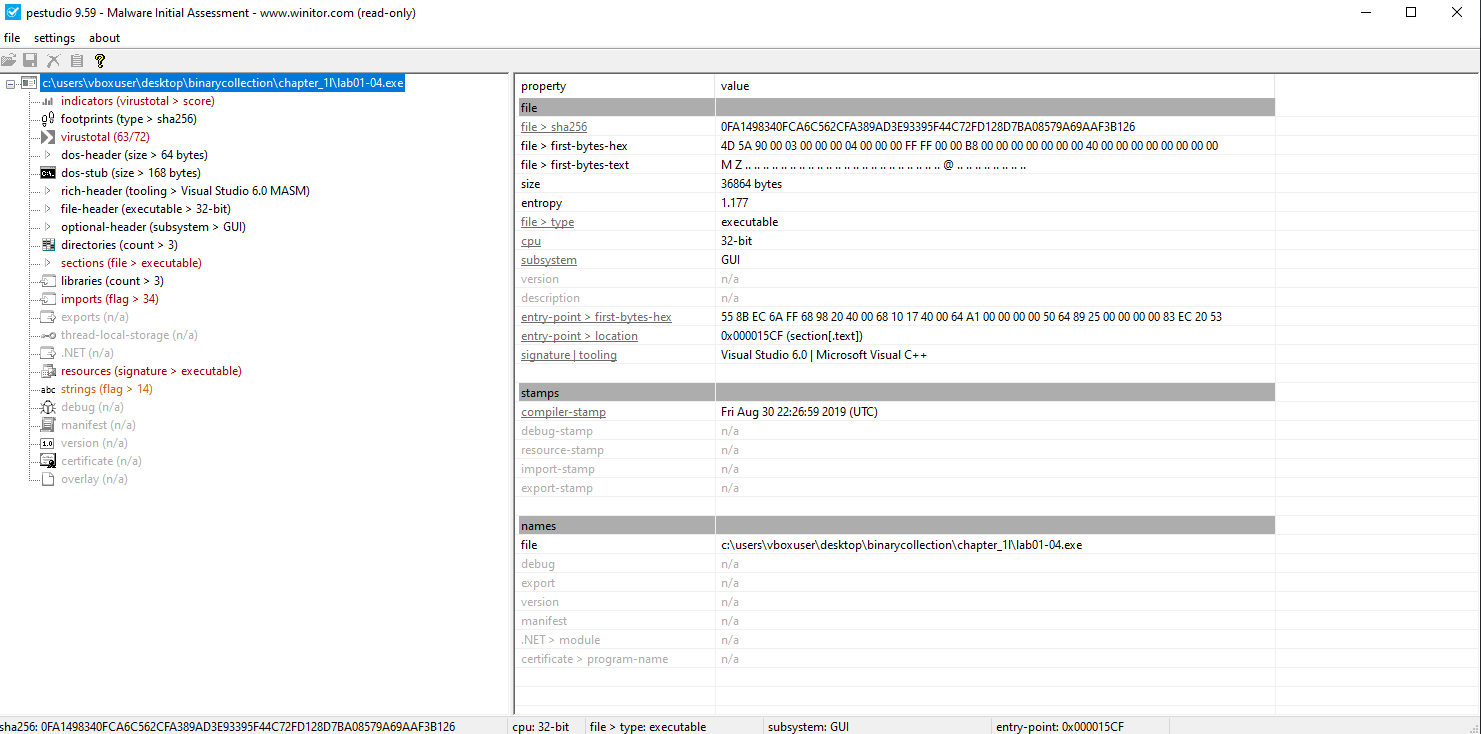
| File | Compilation Time (UTC) |
|---|---|
Lab01-01.exe | Fri Aug 30 22:26:59 2019 |
📍 Question 4: Suspicious Imports
🟪 Lab01-04.exe
Do any imports hint at this program’s functionality? If so, which imports are they and what do they tell you?
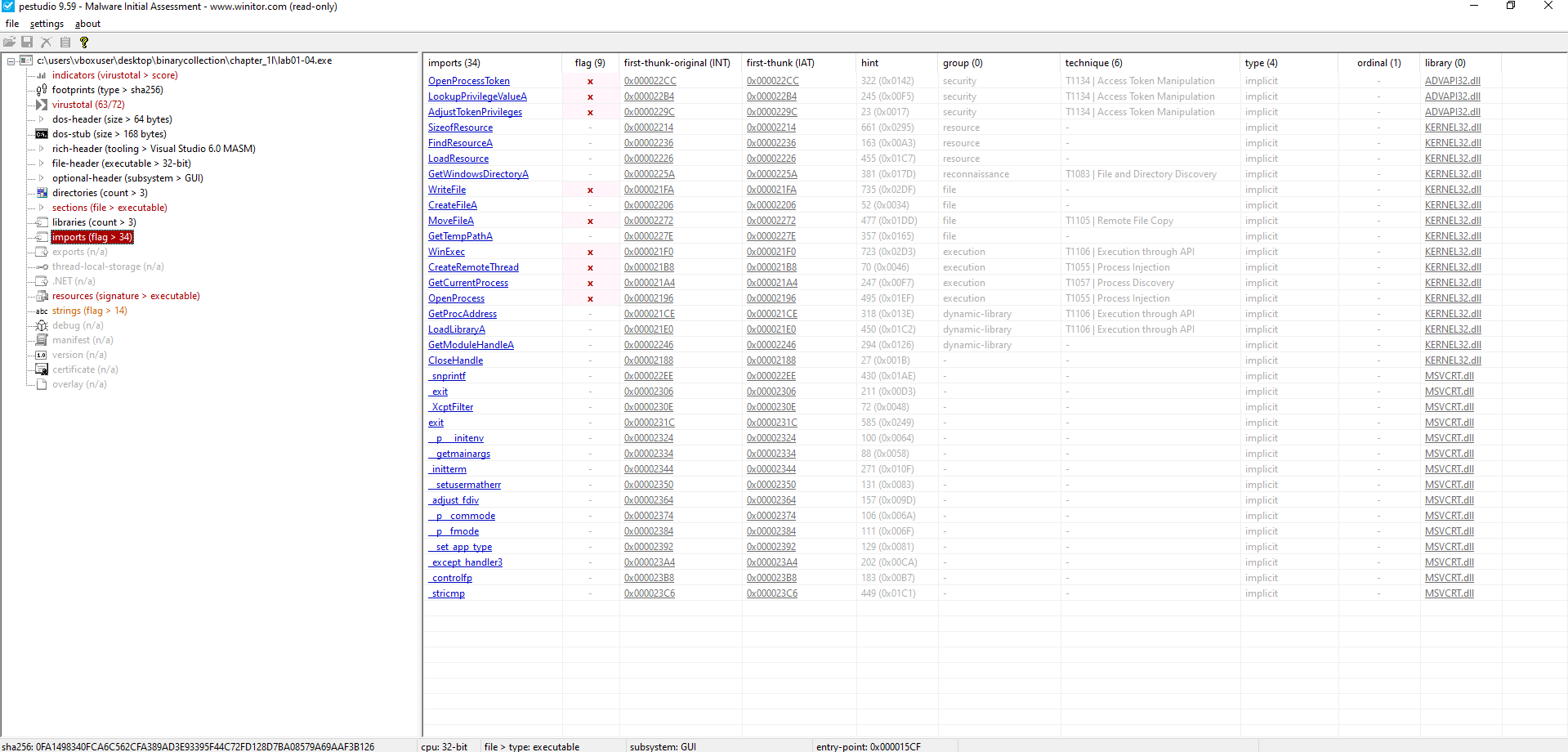
Key Imports (ADVAPI32.DLL):
OpenProcessTokenLookupPrivilegeValueAAdjustTokenPrivileges
Indicates access token manipulation for privilege escalation, possibly enabling
SeDebugPrivilegeto interact with other processes.
Key Imports (KERNEL32.DLL):
CreateFileAWriteFileMoveFileAGetTempPathA
Suggests file manipulation capabilities such as creating, writing, moving files, and using temporary paths—often used for staging malicious payloads.
Key Imports (KERNEL32.DLL):
WinExecCreateRemoteThreadOpenProcess
Points to possible code execution and process injection into other running processes.
Key Imports (KERNEL32.DLL):
LoadLibraryAGetProcAddressGetModuleHandleA
Enables dynamic loading and resolution of APIs or DLLs—commonly used to evade static detection and load payloads at runtime.
📍 Question 5: Network-Based Indicators
🟪 Lab01-04.exe
What host-based or network-based indicators could be used to identify this malware on infected machines?
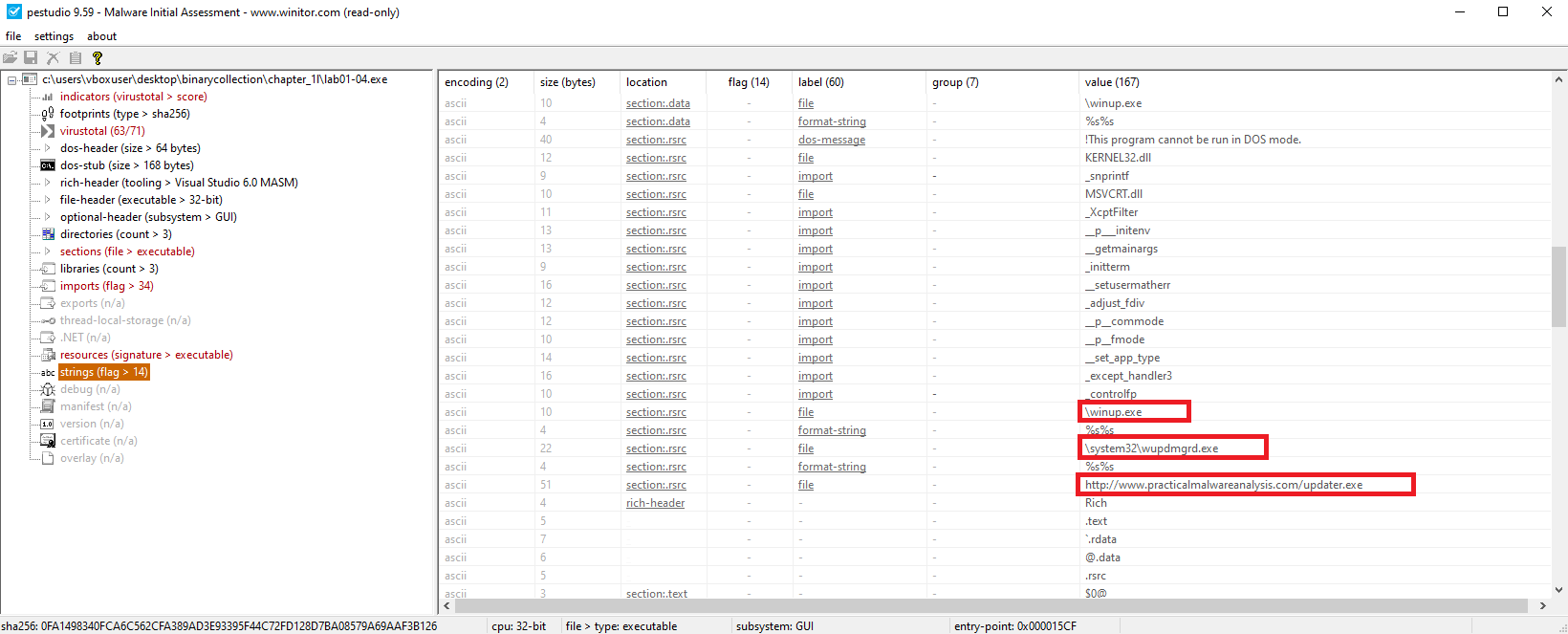
Network-Based Indicators:
- Hardcoded URL:
http://www.malwareanalysisbook.com/updater.exeSuggests the malware attempts to download additional payloads or check in for updates. This is a high-fidelity indicator for network detection.
- Domain:
www.malwareanalysisbook.com
Host-Based Indicators:
- Host-based:
\system32\wupdmgrd.exe\winup.exe
📍 Question 6: Resources
🟪 Lab01-04.exe
This file has one resource in the resource section. Use Resource Hacker to examine that resource, and then use it to extract the resource. What can you learn from the resource?
Steps Performed:
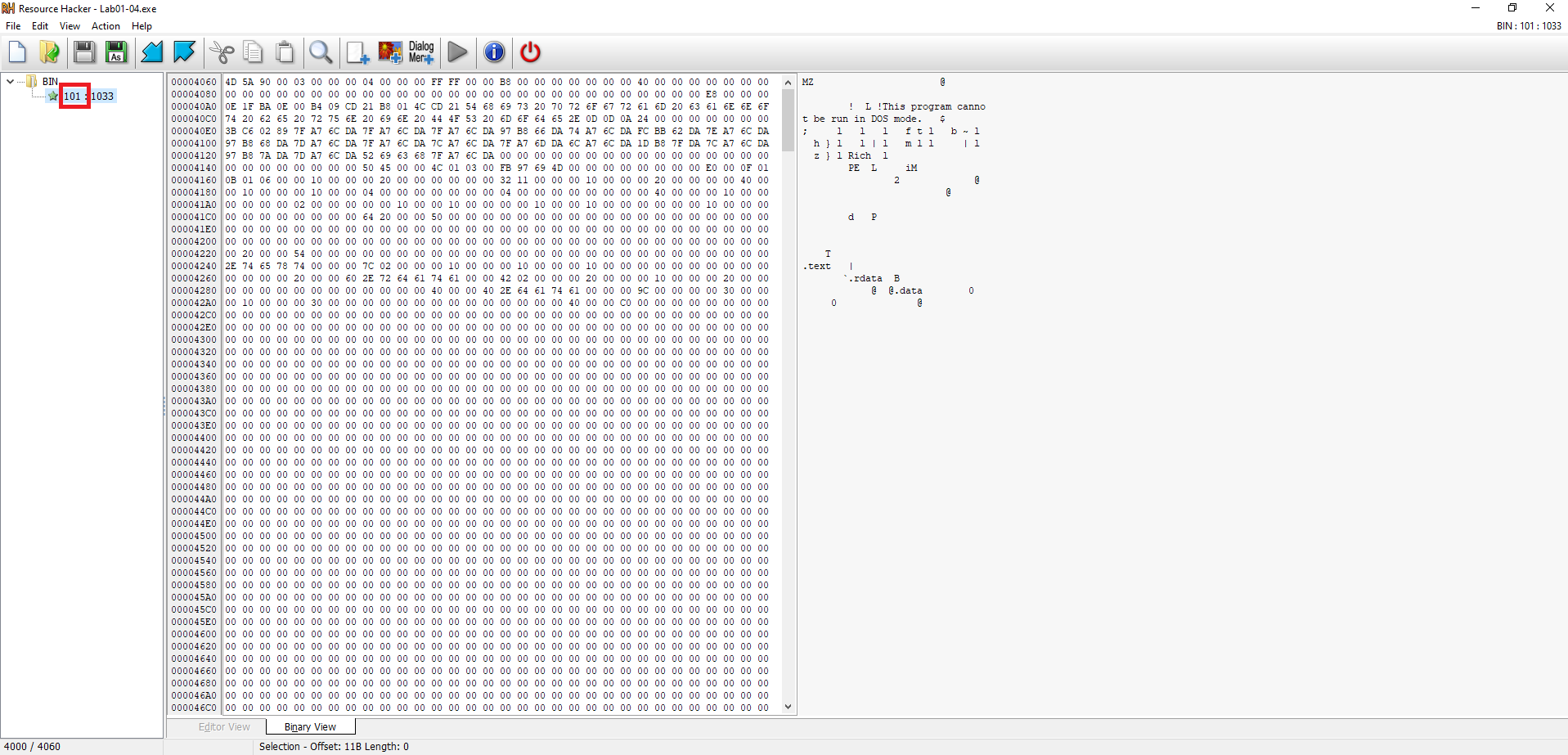
- Opened the sample in Resource Hacker
- Navigated to
.rsrc→RCDATA→101→1033. - Observed that the resource’s binary data begins with
4D 5A(MZ header), confirming it is an embedded executable.
- Navigated to
- Extracted the resource
- Right-clicked
1033→ Save Resource to a bin file → saved it asbin101.bin.
- Right-clicked
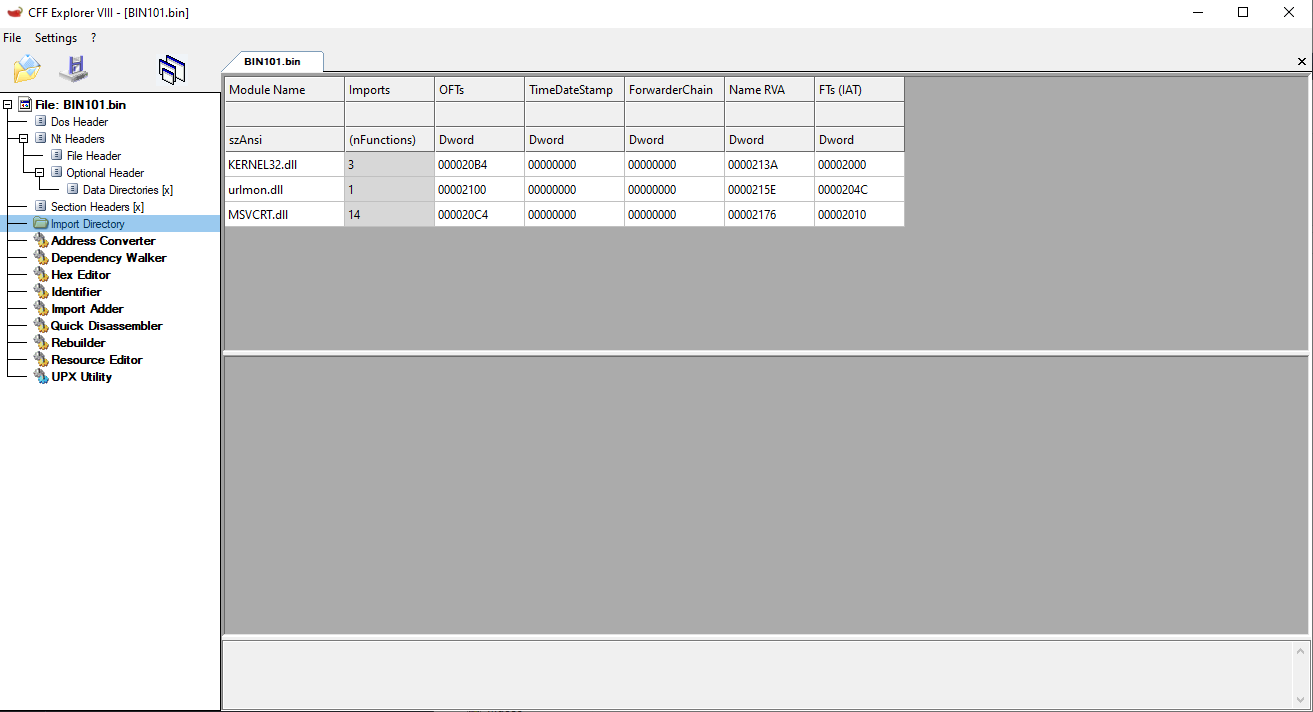
- Inspected the extracted file in CFF Explorer
- Loaded
bin101.binin CFF Explorer and checked the Import Directory. - Found these key imports:
KERNEL32.DLLURLMON.DLL → URLDownloadToFileA
- Loaded

Finally finished Chapter One
Lab 3-1
⚠️ Note:
To properly analyze these labs (3-1 to 3-4), it’s essential to run the samples on Windows XP.
If executed on Windows 10, the malware will terminate immediately without exhibiting its intended behavior.
All analysis in this series is conducted using Windows XP to ensure accurate observation of malware activities.
📝 Summary
Lab03-01.exe is a very small, intentionally simple piece of malware used to practice basic dynamic analysis. Its observable behavior is limited; it performs minimal actions but does establish network activity and can be profiled to extract host- and network-based indicators.
📍 Question 1: Suspicious Imports and Strings
⬜ Lab03-01.exe
What are this malware’s imports and strings?
Imports 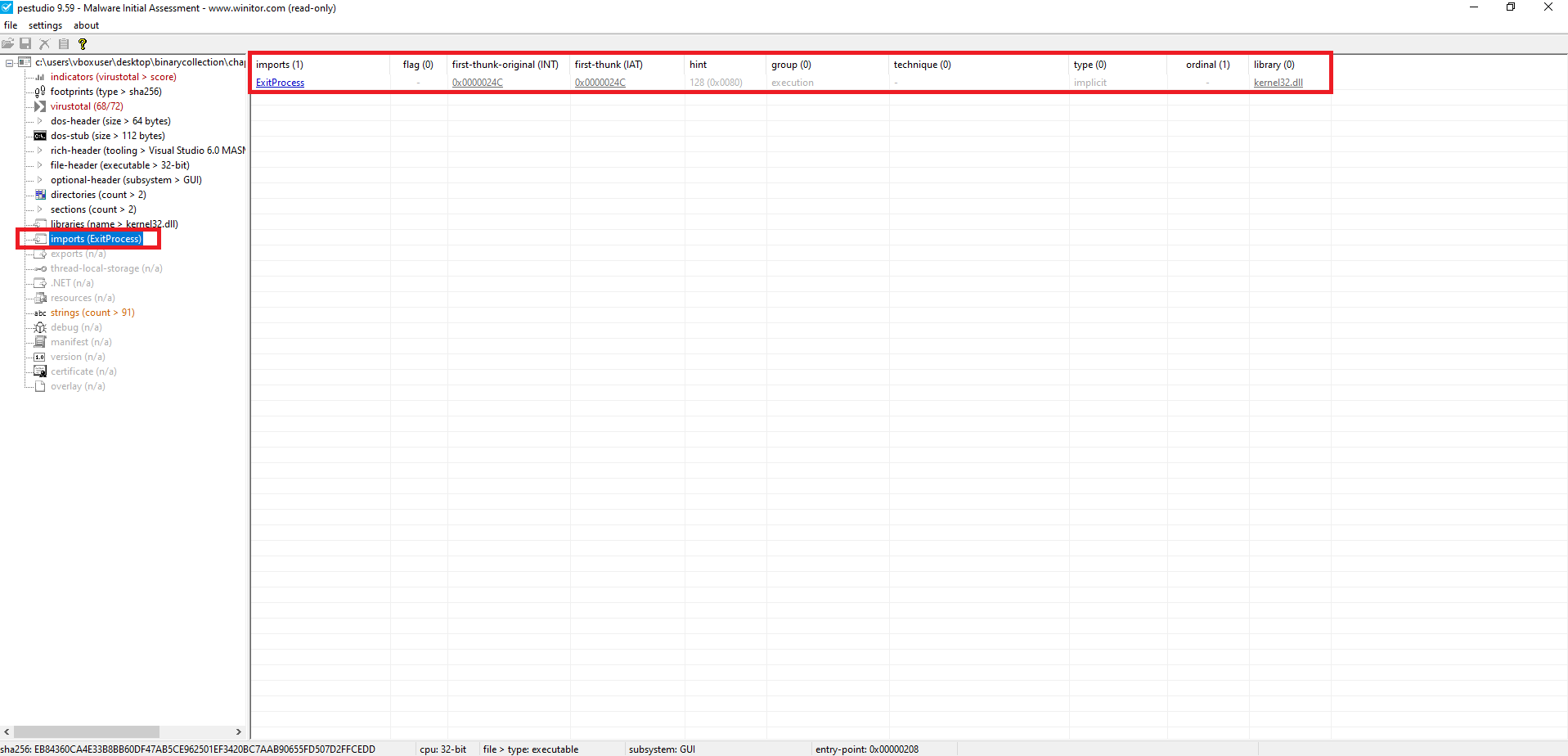
The static import table is extremely minimal: the only statically resolved import is
ExitProcessfromkernel32.dll, which is a hallmark of packing/obfuscation—most meaningful functionality is resolved or loaded at runtime. This forces the analyst to rely on dynamic analysis to see the real behavior.
Strings 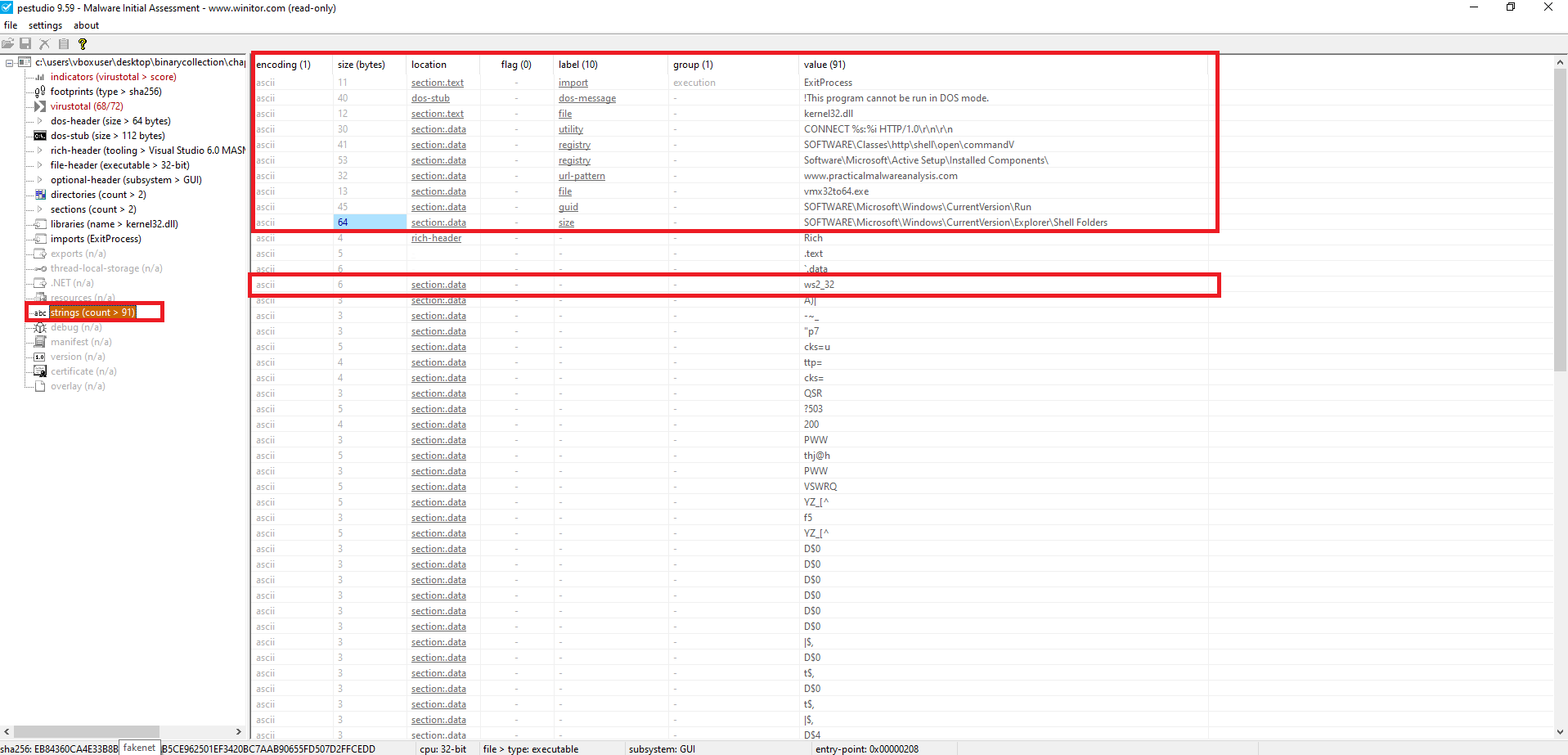
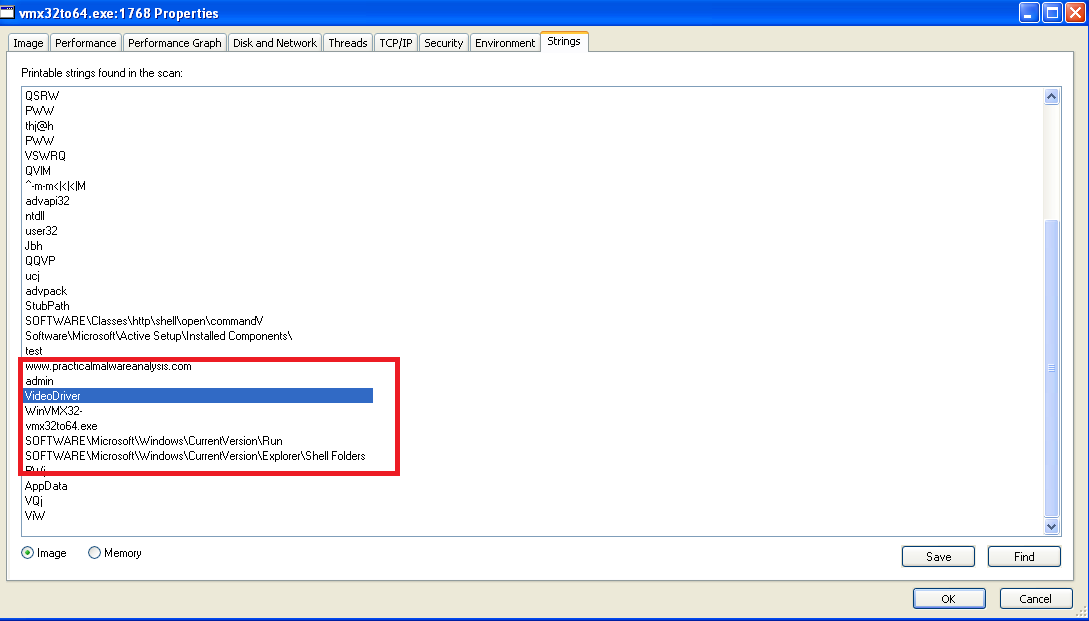
Despite the sparse import table, the binary contains readable strings that hint at network activity, environment checking, and potential persistence or anti-analysis techniques. Notable strings include:
- Interesting Strings:
CONNECT %s: %i HTTP/1.0\r\n\r\n→ indicates potential plain HTTP beaconswww.practicalmalwareanalysis.com→ PMA domainws2_32.dll→ confirms Winsock usage for network comms- Registry references:
SOFTWARE\Microsoft\Windows\CurrentVersion\RunSOFTWARE\Microsoft\Windows\CurrentVersion\Explorer\Shell FoldersSoftware\Microsoft\Active Setup\Installed Components
 Process Monitor
  Process Explorer
 Registry Editor
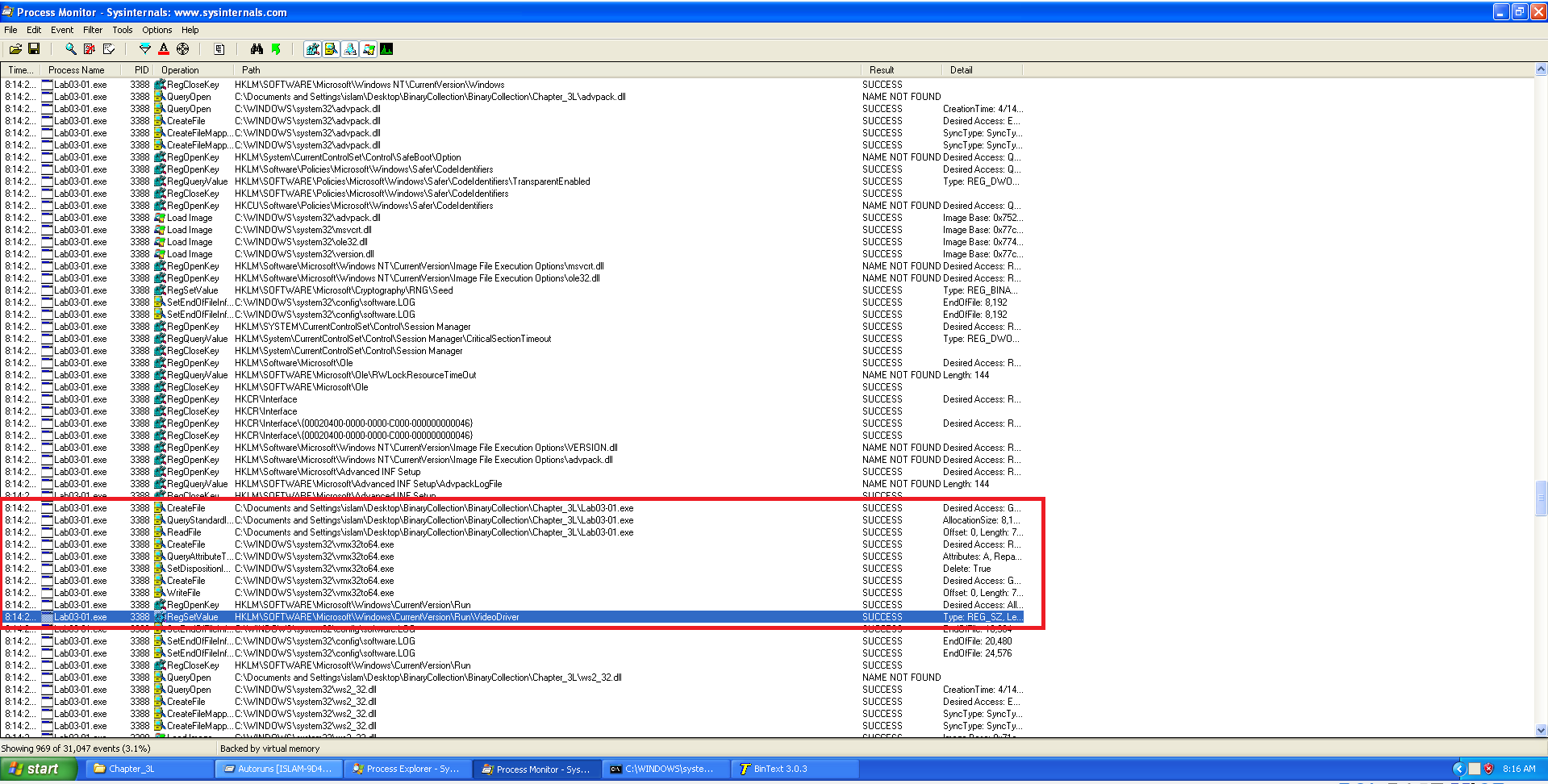
Using Procmon, we identified the following registry behavior:
- HKLM\SOFTWARE\Microsoft\Windows\CurrentVersion\Run
- Standard Windows auto-start location.
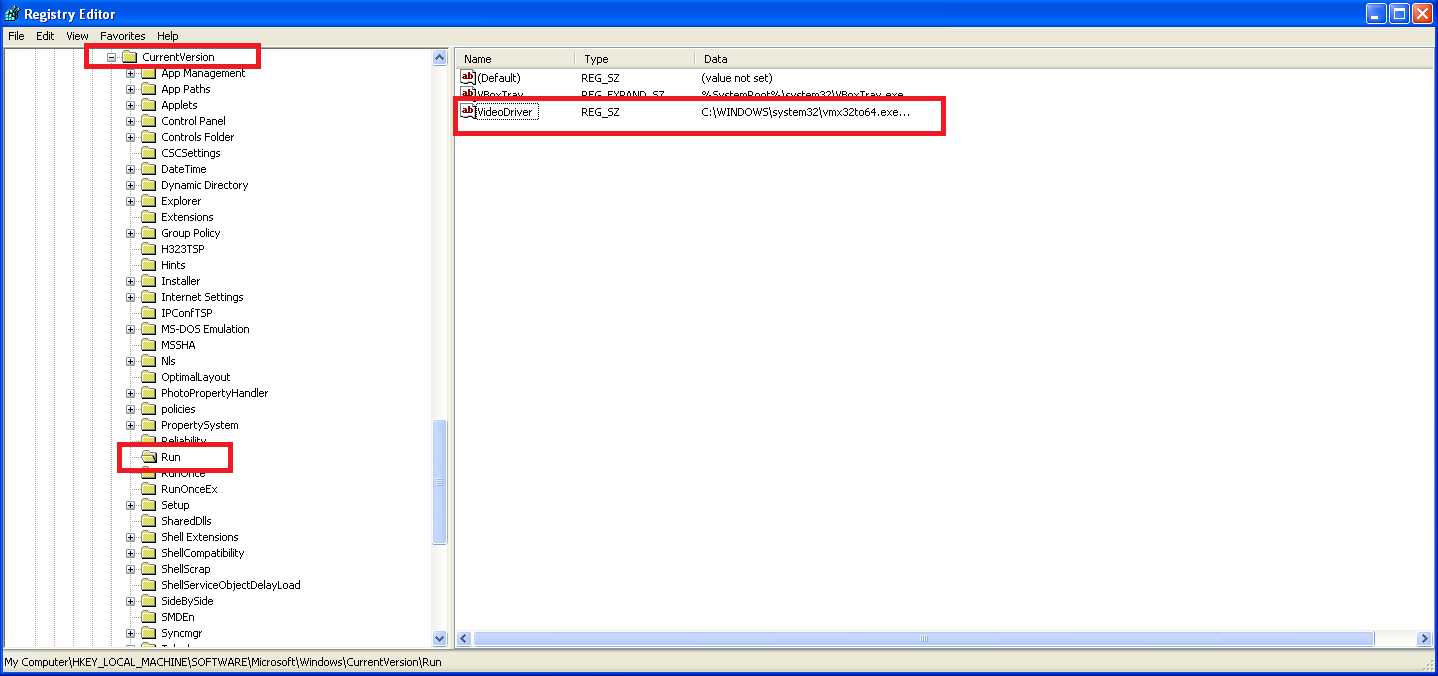
- HKLM\SOFTWARE\Microsoft\Windows\CurrentVersion\Run\VideoDriver
- A new value was written with the following data:
📍 Question 2: host-based indicators
⬜ Lab03-01.exe
- What are the malware’s host-based indicators?
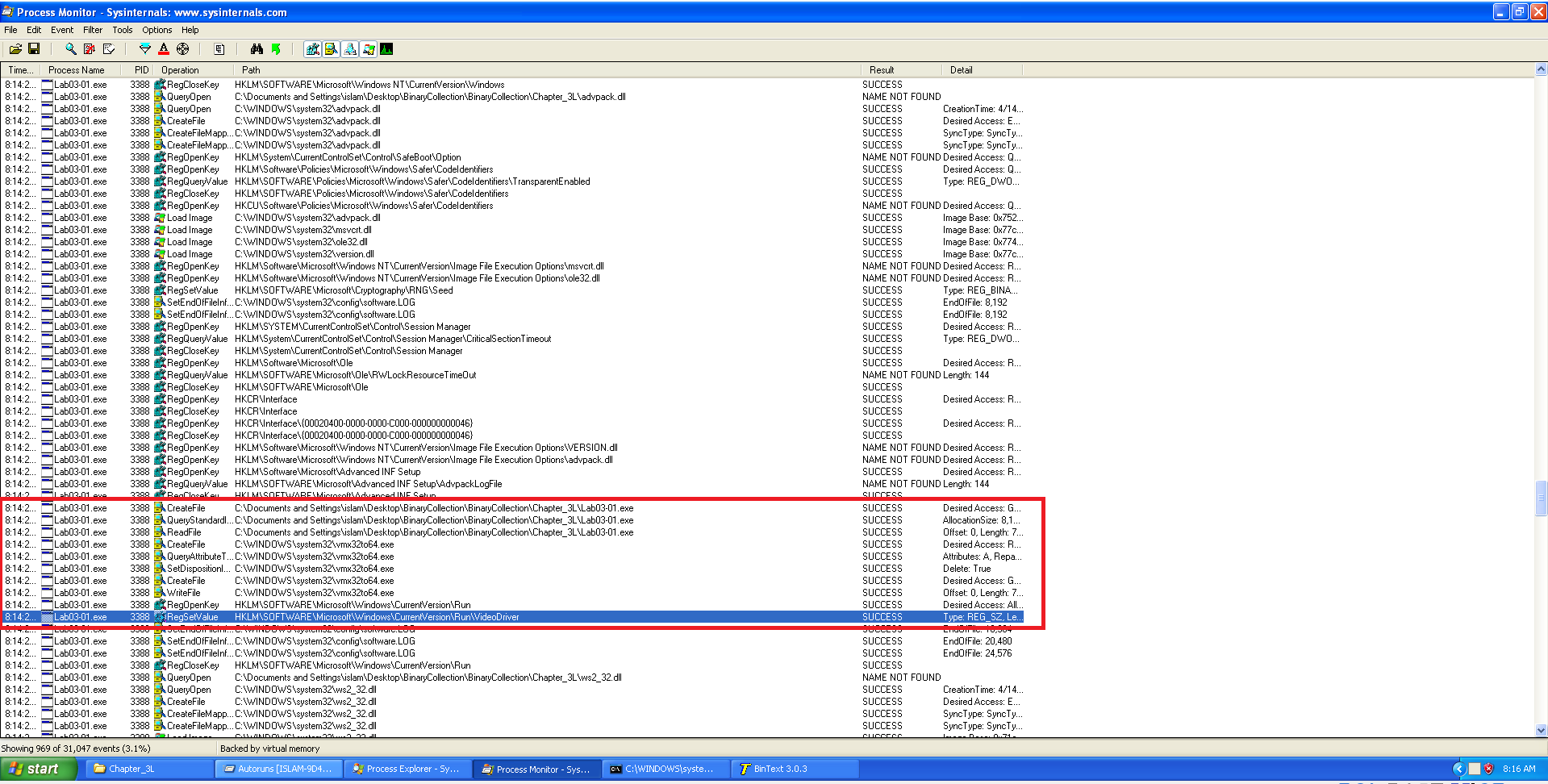
Registry keys of interest:
- HKLM\SOFTWARE\Microsoft\Windows\CurrentVersion\Run
- This registry hive is commonly abused by malware for establishing persistence. It ensures malicious code is launched automatically at every system startup.
- HKLM\SOFTWARE\Microsoft\Windows\CurrentVersion\Run\VideoDriver
- The malware sets the value of this subkey to point to the dropped executable.
- A Mutex is created:
"WinVMX32"This mutual exclusion object acts as a lock, likely used to prevent multiple instances of the malware from running simultaneously.
- The malware copies itself to:
C:\Windows\System32\vmx32to64.exe
📍 Question 3: Netwwork-based indicators
⬜ Lab03-01.exe
- Are there any useful network-based signatures for this malware? If so, what are they?

Yes. The following network-based signatures are useful for detection:
DNS resolution of
www.practicalmalwareanalysis.com. Outbound http traffic.
Lab 3-2
📝 Summary
Lab03-02.dll is a malware sample analyzed for its behavior and characteristics. It exhibits stealthy behavior, attempting to avoid detection by using various obfuscation techniques. The dynamic analysis revealed its capability to inject malicious code into legitimate processes, potentially allowing it to evade traditional antivirus detection. This behavior highlights its advanced nature compared to simpler malware samples.
📍 Question 1: Installation
🟫 Lab03-02.dll
How can you get this malware to install itself?
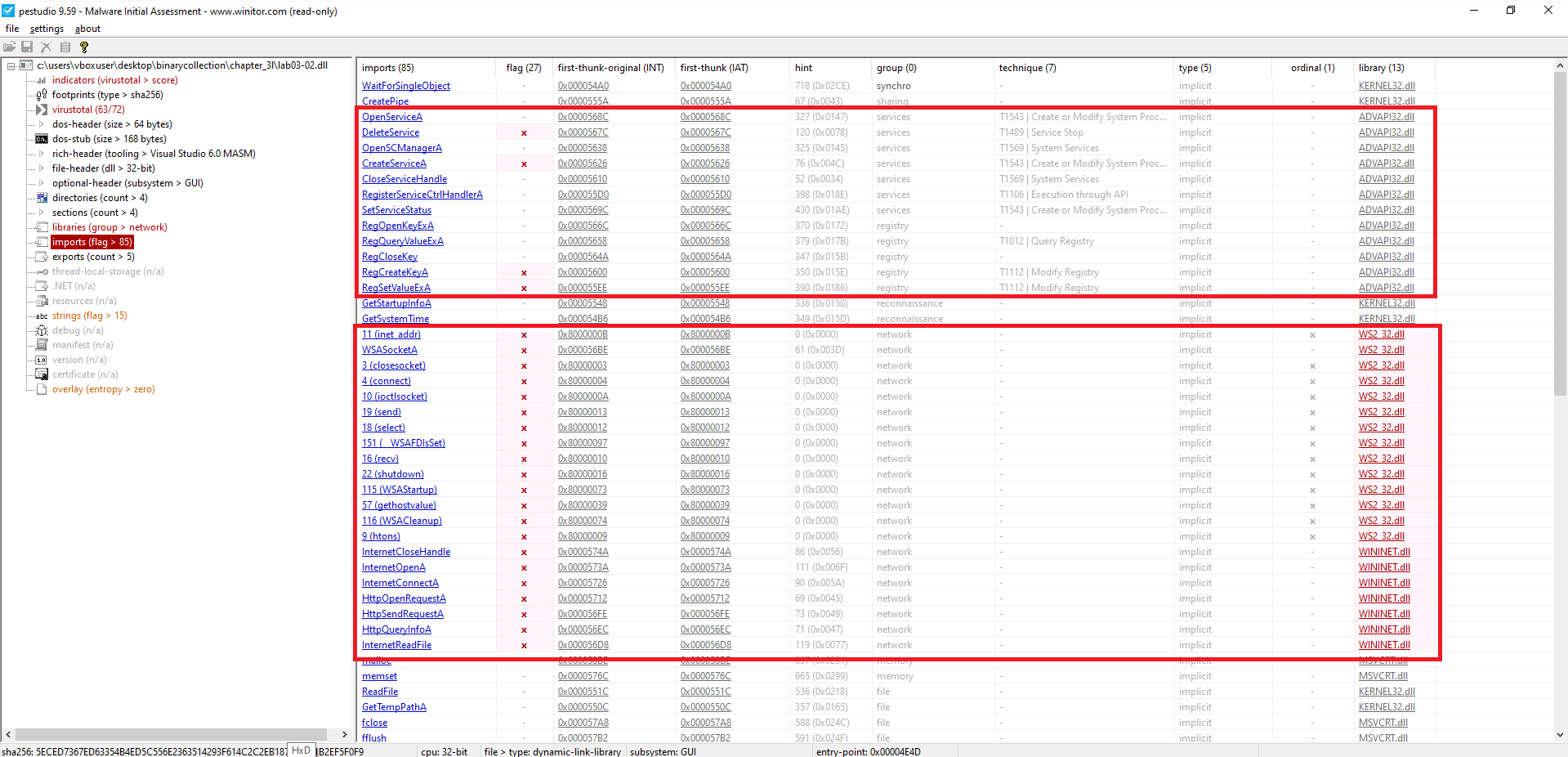 PE Studio
- Registry Manipulation (ADVAPI32.dll)
RegSetValueExA
RegCreateKeyA
Modify or add registry keys for persistence or configuration changes.
- Service Control (ADVAPI32.dll)
CreateServiceA, OpenServiceA, OpenSCManagerA, CloseServiceHandle, SetServiceStatus
Creates or interacts with Windows services – often abused for persistence or privilege escalation.
DeleteService
May attempt to remove or disable services.
- High-level (WININET.dll):
InternetOpenA, InternetConnectA, InternetReadFile, InternetCloseHandle, HttpOpenRequestA, HttpSendRequestA, HttpQueryInfoA
Indicates HTTP/S communication — C2, or data exfiltration.
- Low-level (WS2_32.dll):
WSASocketA, connect, send, recv, closesocket, select, shutdown, inet_addr, WSAStartup, WSACleanup, ioctlsocket, __WSAFDIsSet, htons, gethostvalue
Suggests use of custom TCP sockets – often seen in malware with its own networking stack.
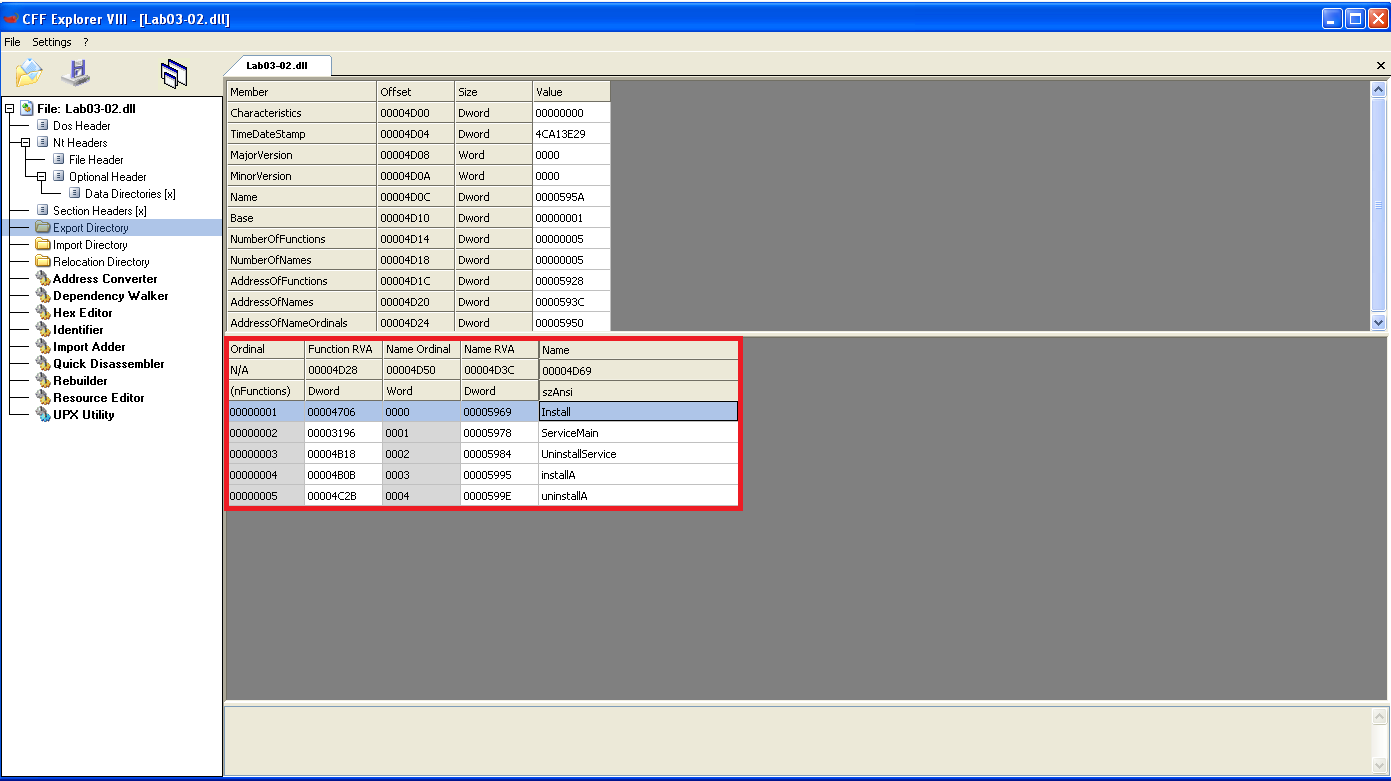 CFF Explorer
These functions are likely tied to Windows service manipulation:
InstallandServiceMainare typical for service initialization.UninstallServicesuggests cleanup logic.installA/uninstallAmight be ASCII variants or aliases.
1
rundll32.exe Lab03-02.dll,install
📍 Question 2: Persistence I
🟫 Lab03-02.dll
How would you get this malware to run after installation?
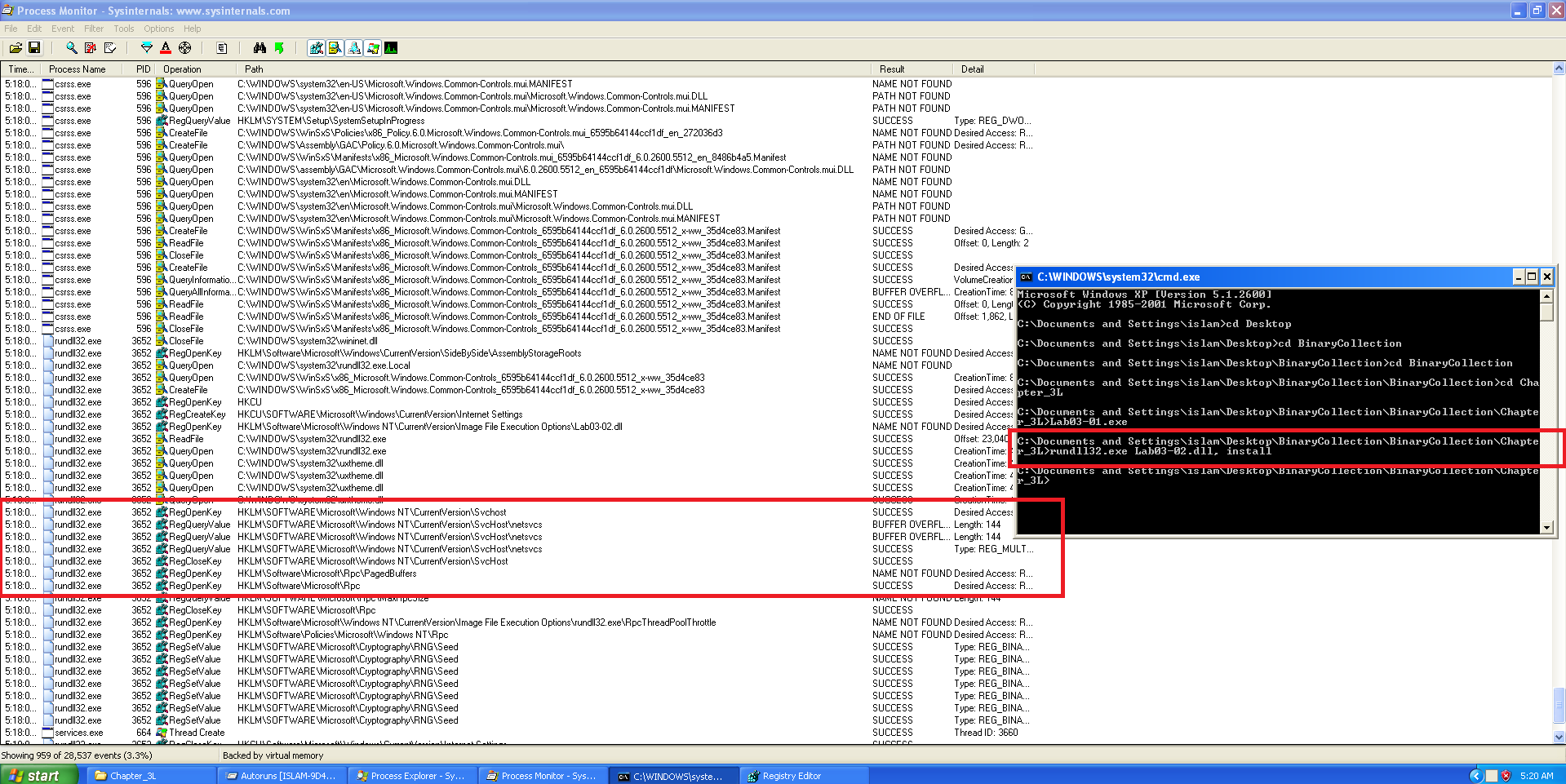 Process Monitor
Registry Activity
The following registry-related API calls were captured during execution of the malware:RegOpenKeyKey:
HKLM\SOFTWARE\Microsoft\Windows NT\CurrentVersion\SvchostRegQueryValueKey:
HKLM\SOFTWARE\Microsoft\Windows NT\CurrentVersion\Svchost\netsvcs
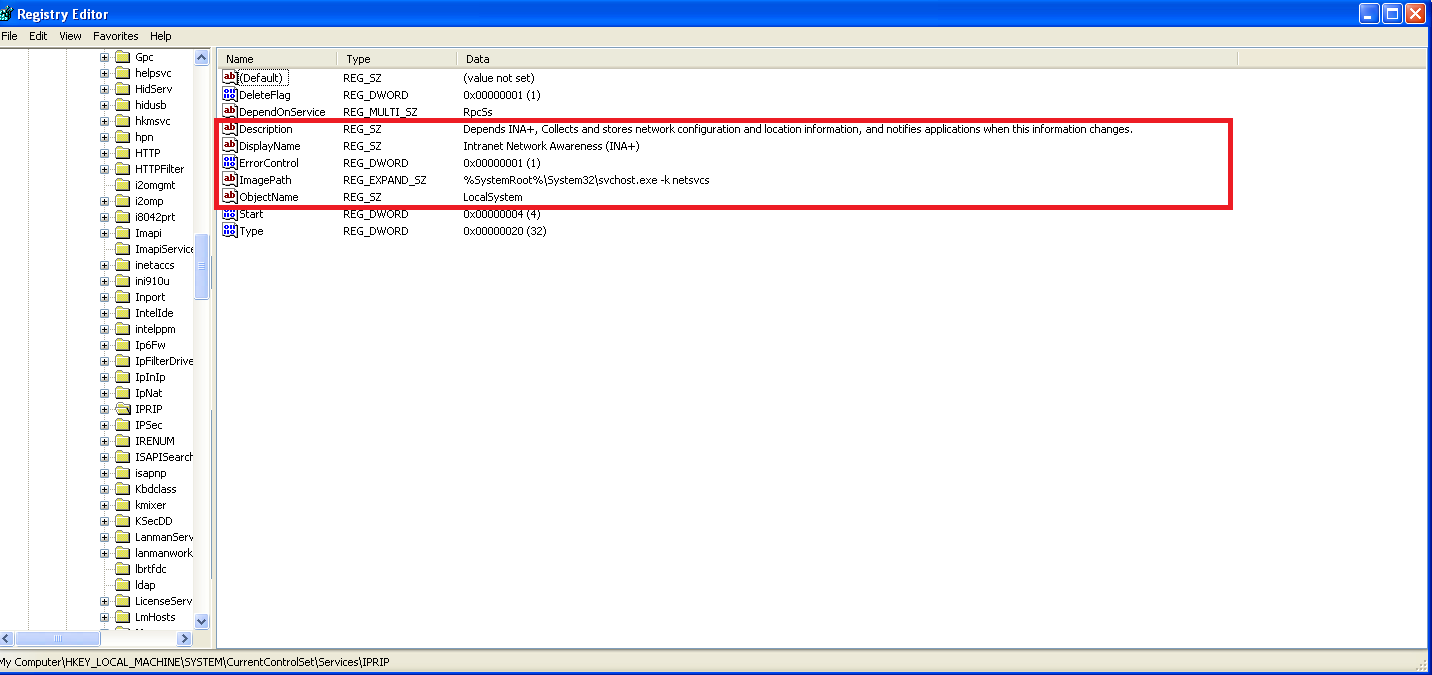 Registry Editor
The malware installs itself as a Windows service with the name IPRIP.
To manually run the service after installation, you can use either of the following methods:
1
sc start IPRIP
–
📍 Question 3: Persistence II
🟫 Lab03-02.dll
How would you get this malware to run after installation?
By searching for the specified DLL (Lab03-02.dll) or examining the DLLs loaded by processes in Process Explorer, we can identify the process ID (PID) of the svchost.exe instance hosting the malicious service (IPRIP).
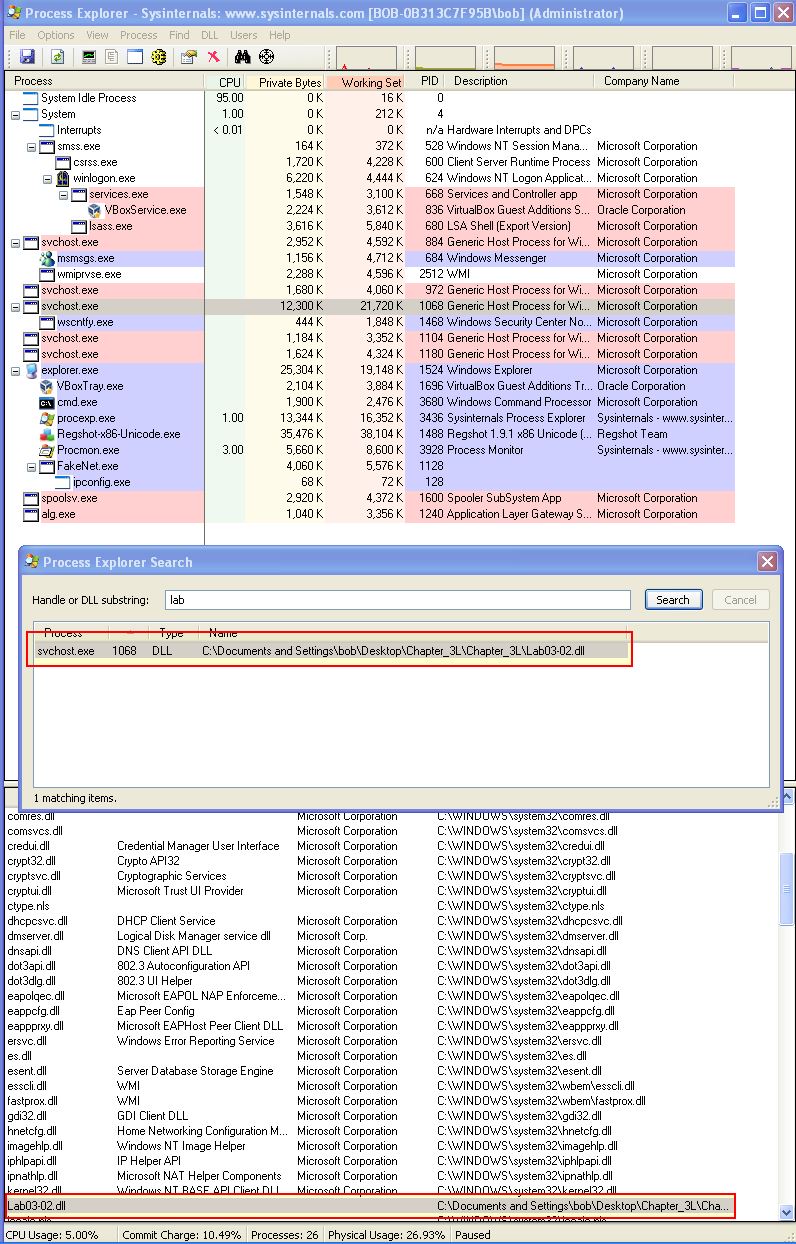 jai minton screenshot
- PID: 1068
📍 Question 4: procmon filter
🟫 Lab03-02.dll
- Which filters could you set in order to use procmon to glean information?
Because there’s likely to be multiple svchost processes, we can filter by the Process ID to glean information only on the svchost process responsible for running this malware.
📍 Question 5: host-based indicators
🟫 Lab03-02.dll
- What are the malware’s host-based indicators?
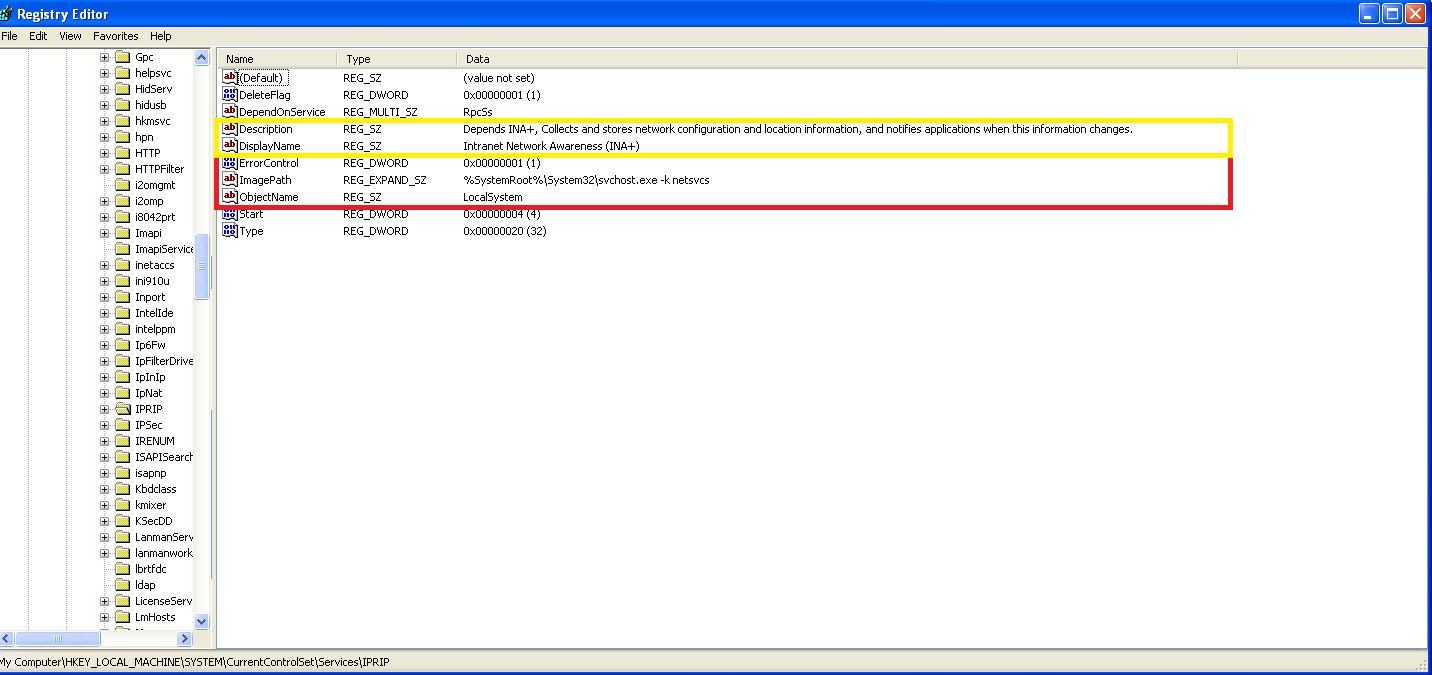 Registry Editor
- A malicious service is created with the name
IPRIP. - Service description observed: Intranet Network Awareness (INA+)
- Depends on INA+
- Collects and stores network configuration and location information, and notifies applications when this information changes.
- Registry entry for the service DLL:
📍 Question 6: network-based indicators
🟫 Lab03-02.dll
- Are there any useful network-based signatures for this malware?
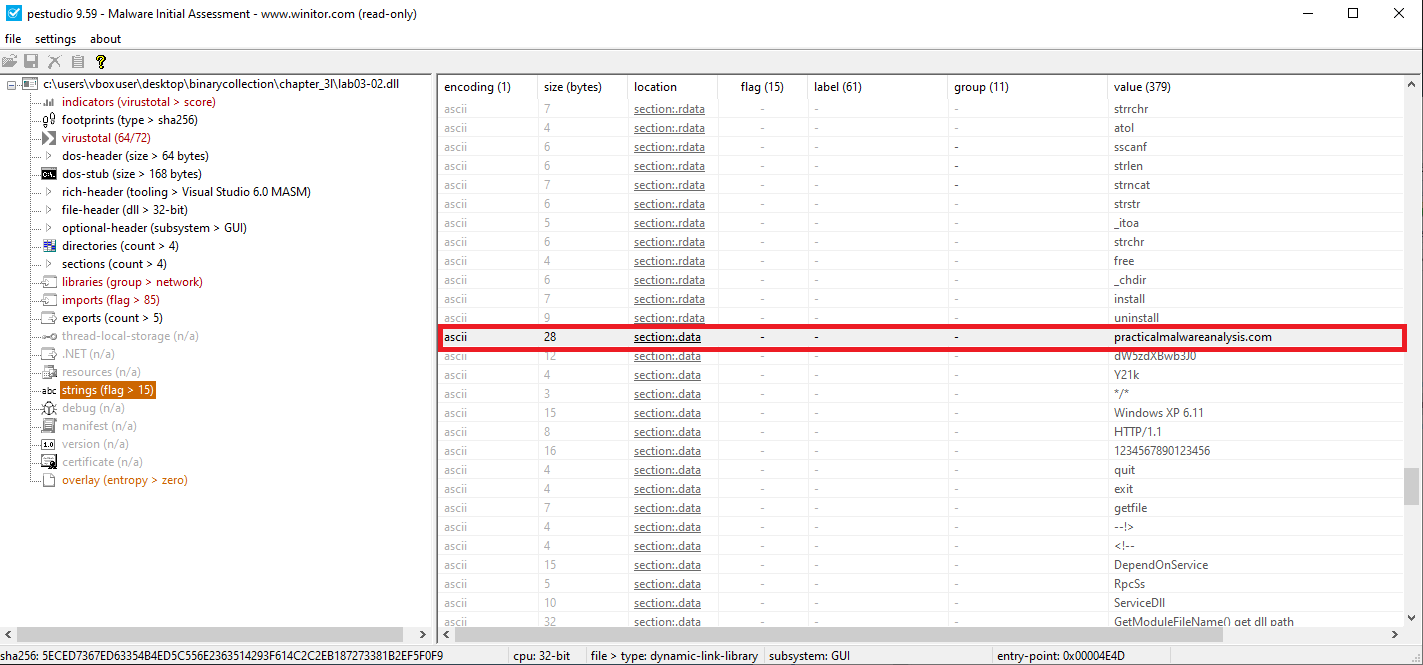 PEStudio
Observed Network Activity
- During static analysis in PEStudio, the malware was found to attempt a connection to the following domain:
practicalmalwareanalysis.com.
Lab 3-3
📝 Summary
The malware Lab03-03.exe is a dropper that uses a common stealth technique known as process hollowing (or process replacement). It works by launching a legitimate Windows process, svchost.exe, in a suspended state. It then overwrites the memory of this new process with its own malicious code before finally resuming its execution.
This allows the malware’s core logic, including its network communication, to run under the guise of a trusted system process, making it significantly harder to detect.
📍 Question 1: Process Behavior
🟧 Lab03-03.exe
What do you notice when monitoring this malware with Process Explorer?
When you run Lab03-03.exe, its behavior is a classic giveaway:
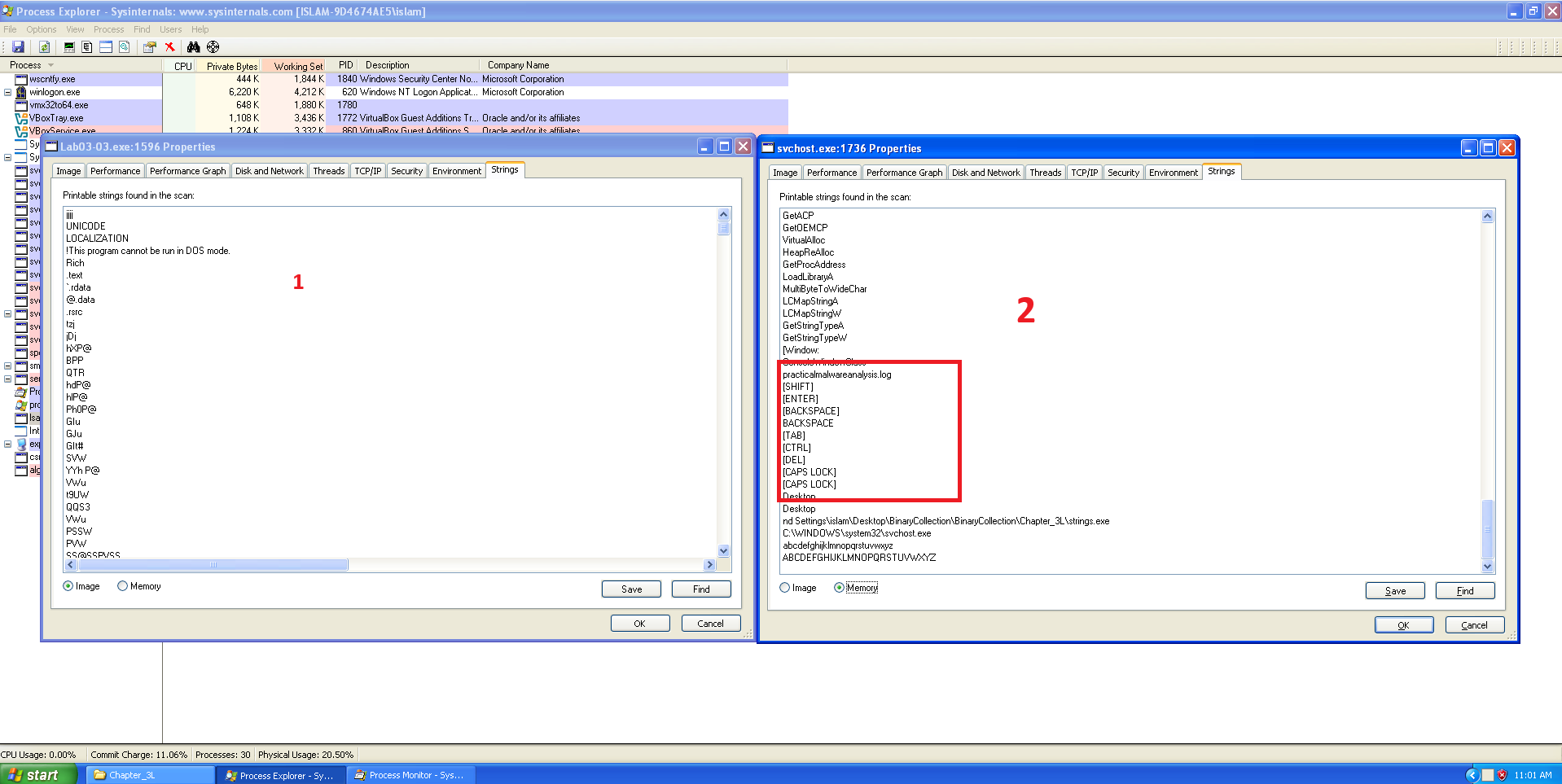 Process Explorer
- It appears in Process Explorer for only a brief moment before terminating.
- It immediately spawns a new instance of
svchost.exeas a child process. - The parent process,
Lab03-03.exe, then exits, leaving thesvchost.exeprocess running without a parent.
This “launch-and-terminate” behavior is highly suspicious. It’s a textbook indicator of a process injector, whose sole purpose is to load malware into another process and then disappear.
📍 Question 2: Memory Modification
🟧 Lab03-03.exe
Can you identify any live memory modifications?
Yes, live memory modifications are clearly visible. The svchost.exe process created by the malware is a hollowed-out version of the legitimate system process.
Process Explorer
You can confirm this using Process Explorer:
- Right-click the suspicious
svchost.exeprocess and select Properties. - Navigate to the Strings tab.
You will find strings that do not belong in a legitimate svchost.exe instance, such as:
practicalmalwareanalysis.com\svchost.exe
These strings are definitive proof that the memory of
svchost.exewas overwritten with malicious code.
📍 Question 3: Host-Based Indicators
🟧 Lab03-03.exe
What are the malware’s host-based indicators?
 Screen shot
- The malware creates the log file practicalmalwareanalysis.log.
📍 Question 4:
🟧 Lab03-03.exe
What is the malware’s purpose?
By typing in an application like WordPad and then examining the file practicalmalwareanalysis.log, we can see that the malware has logged all of our keystrokes.
The program’s primary purpose is to function as a stealthy keylogger. A keylogger’s goal is to steal sensitive information like usernames, passwords, and financial details by secretly recording everything a user types.
The malware achieves this by injecting its keylogging payload into the svchost.exe process, effectively hiding its malicious activity within a trusted system process.
Lab 3-4
📝 Summary
Lab03-04.exe is a multi-stage dropper/backdoor that uses a simple anti-analysis check.
It searches for a specific file (C:\WINDOWS\system32\wuamgrd.exe) and exits silently if the file is not present.
On a clean sandbox the process appears to start and then terminates within milliseconds, leaving no files, no registry changes, and no network activity. The sample only proceeds to its backdoor behavior when its environmental check is satisfied.
📍 Question 1: Initial Behavior
🟩 Lab03-04.exe
What happens when you run this file?
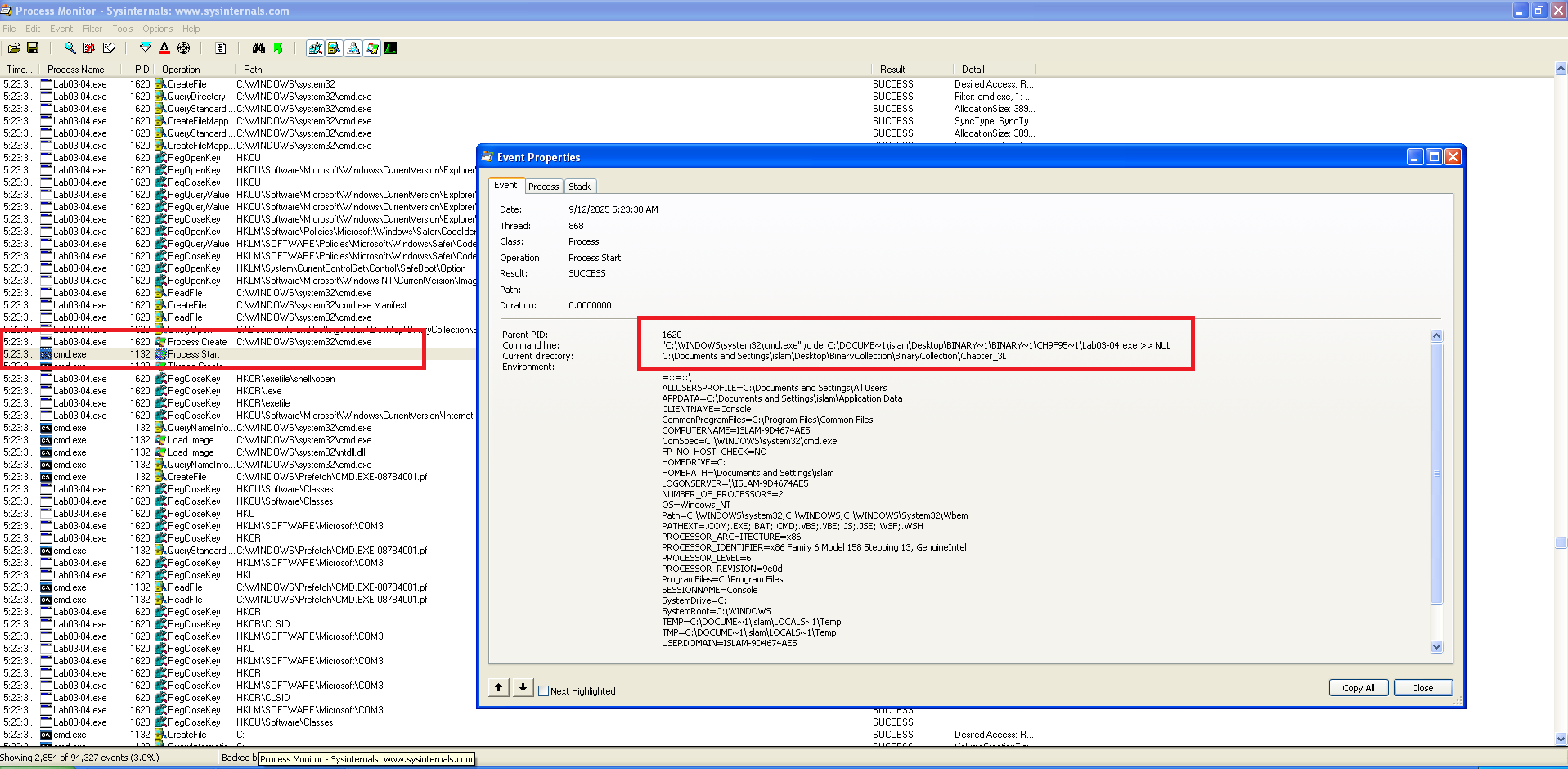 ProcMon (ProcMon shows the full command-line used to delete the original binary, redirected to NUL.)
When executed in a clean analysis VM or sandbox:
- The process launches and then immediately terminates (appears for a fraction of a second).
- No files are written, no registry keys are modified.
This silent exit indicates an early environment check designed to hide malicious behavior in automated environments.
📍 Question 2: The Roadblock
🟩 Lab03-04.exe
What is causing the roadblock in dynamic analysis?
PEStudio
Among the strings, we find:
- A domain name reference
- The registry path
SOFTWARE\Microsoft\XPS - Keywords such as
DOWNLOAD,UPLOAD - The presence of
HTTP/1.0
These indicators strongly suggest the sample functions as an HTTP-based backdoor. It is likely capable of communicating with a remote server, performing file transfers, and maintaining persistence through registry modifications.
📍 Question 3: Bypassing the Roadblock
🟩 Lab03-04.exe
Are there other ways to run this program?
We attempted to exercise alternate code paths by supplying candidate arguments derived from the program strings (for example: cc, re, in). Despite these attempts the sample still spawns cmd.exe to issue a delete command and the file is removed during execution.
At this stage the binary consistently self-cleans and returns no additional observable behavior, so further dynamic exploration is limited. This avenue will be revisited in Lab 9, where we’ll apply more advanced techniques (memory dumping, debugger-assisted tracing, and controlled network responses) to recover the secondary payload and trigger hidden functionality.
 yeeaaaaaaaah